Your workflow is unique 👨💻 - tell us how you use Dropbox here.
Forum Discussion

9876543210
5 years agoExplorer | Level 4
I'm getting an error that the mobile app is not compatible with my Android device. Why is that?
As per my first image from the Android Play Store, It explains that the latest version of Dropbox is no longer compatible with my Samsung Galaxy TM235 :tired_face: The second scree...
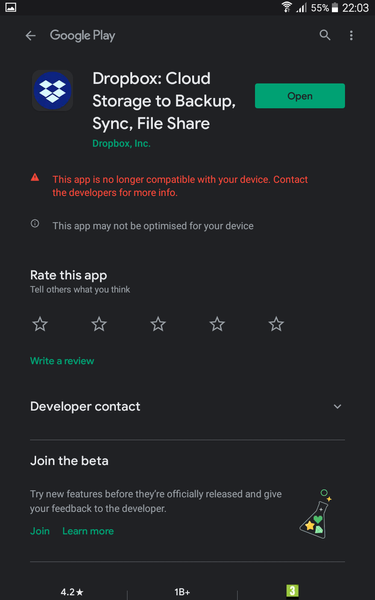
- 5 years ago
Hello there 9876543210, I'm sorry to hear you're having trouble with this!
Is it possible that you're device is running an OS version lower than 6.0?
The minimum requirements for the Android app is that your device is running 6.0 or later.
Let me know if this is the case!

Daphne Dropbox Community Moderator
5 years agoDropbox Community ModeratorHello there 9876543210, I'm sorry to hear you're having trouble with this!
Is it possible that you're device is running an OS version lower than 6.0?
The minimum requirements for the Android app is that your device is running 6.0 or later.
Let me know if this is the case!
 98765432105 years agoExplorer | Level 4
Hello Daphne
many thanks for your reply and the details within.
I checked and , My tablet is only on Android version 5.1.1 (sadly) I booked an appointment with the Tablet manufacturer with the hope that they can suggest how I might update the build or load and older version.
As a Dropboxer would you know what the latest version of Dropbox that is compatibile with older Andriod versions please?
Kind regards MB
- 98765432105 years agoExplorer | Level 4
I did check here: not-supported However that page only (now I look again) seems to show Computer builds not Andriod or IOS
Is there another page or location I could have checked please?
Thanks again MB
- Jay5 years ago
Hi 9876543210, it isn't possible to install an older version of the Dropbox mobile app, since it won't be able to sign into your account if it isn't on Android 6.0 or higher.
I'm sorry to be the bearer of bad news. If there's any additional information you require, please let me know.

About Apps and Installations
Have a question about a Dropbox app or installation? Reach out to the Dropbox Community and get solutions, help, and advice from members.
The Dropbox Community team is active from Monday to Friday. We try to respond to you as soon as we can, usually within 2 hours.
If you need more help you can view your support options (expected response time for an email or ticket is 24 hours), or contact us on X, Facebook or Instagram.
For more info on available support options for your Dropbox plan, see this article.
If you found the answer to your question in this Community thread, please 'like' the post to say thanks and to let us know it was useful!


