Your workflow is unique 👨💻 - tell us how you use Dropbox here.
Forum Discussion

eweberGA
1 year agoExplorer | Level 4
Lost Dropbox Quick Actions on Mac - "Make Available Offline", etc
Hello, I'm on a MacBook Pro which is running the operating system, Sonoma 14.4 Starting a couple of weeks ago, I suddenly lost the ability to access the Dropbox desktop app "Quick Actions". I...
- 1 year ago
Thanks for the information. I'd recommend checking with the support team directly for them to investigate this matter in more detail on their end.


eweberGA
1 year agoExplorer | Level 4
Hi Megan,
I tried the steps listed for Extensions, but I didn't have a "Dropbox Finder Integration" option available - when I found the Extensions section, I only saw the following:
I attempted unchecking each box then refreshing the Finder but the Dropbox App options still haven't appeared.

Megan Dropbox Community Moderator
1 year agoDropbox Community Moderator- eweberGA1 year agoExplorer | Level 4
Hello, thanks again for your help with all of this. No luck on the force quit either -
What's odd is the Finder doesn't recognize that Dropbox is even "open" as an application despite the fact that I am actually IN the Dropbox and able to access folders, etc. Again, I've blacked out folder names, etc. to keep the privacy of the materials.
- eweberGA1 year agoExplorer | Level 4
Hi Jay,
Yep, the app is actually running on my machine - here's the top bar and what it looks like opened up:
I am able to actually work on files via a workaround where I manually drag the files I want to review on to my desktop. Then when I'm finished, I manually drag them BACK onto the Dropbox again and by using the toolbar up top, I will select Manage Hard Drive Space and push them back to online.
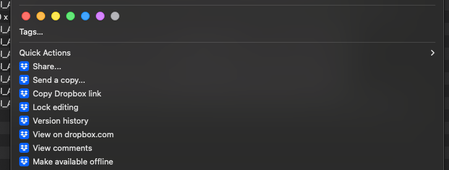
The initial problem is that I'm not able to sync them to my machine like I used to a couple of weeks ago - where by right-clicking an asset on the Dropbox, I would see these options available:
I am not seeing these official Dropbox actions anymore:
I'm currently on Sonoma OS and my colleagues on Ventura are not experiencing this issue and are able to see those Dropbox actions still.
- Jay1 year ago
Thanks for the information. I'd recommend checking with the support team directly for them to investigate this matter in more detail on their end.
 COH11 year agoExplorer | Level 3
I'm experiencing similar issues and have been told to install the DB for MacOS File Provider. I found it very disconcerting to see my folders disappear from my Mac! I had a particular structure for projects (on my desktop) v records (in my documents folder) which no longer seems available to me. Everything is still somewhere and findable but I am not able to replace the file structure on my hard drive as I would like it. I have paused before the install to see if anyone has taken this action and found it works OK. Reading some of the articles I see that the default location for the dropbox folder in this new system changed when you do this:
- Your Dropbox folder will be moved to ~/Library/CloudStorage.
How, therefore, do I get the structure back on to my local drive?
About Apps and Installations
Have a question about a Dropbox app or installation? Reach out to the Dropbox Community and get solutions, help, and advice from members.
The Dropbox Community team is active from Monday to Friday. We try to respond to you as soon as we can, usually within 2 hours.
If you need more help you can view your support options (expected response time for an email or ticket is 24 hours), or contact us on X, Facebook or Instagram.
For more info on available support options for your Dropbox plan, see this article.
If you found the answer to your question in this Community thread, please 'like' the post to say thanks and to let us know it was useful!


