Your workflow is unique 👨💻 - tell us how you use Dropbox here.
Forum Discussion

twid
3 years agoExplorer | Level 4
Mac OS Ventura - incompatible?
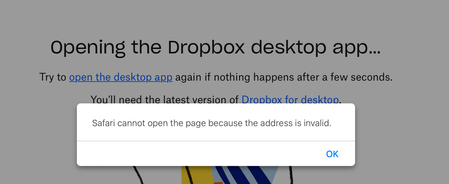
I am a new premium subscriber as of yesterday. I updated to MacOS Ventura on Wednesday. Trying to open the Dropbox desktop app and I receive the error above.
Thanks,
- 3 years ago


Jay Dropbox Community Moderator
3 years agoDropbox Community ModeratorHi radlyeel, from the screenshot, it seems you have Malwarebytes installed and running.
Could you try temporarily disabling it to reinstall the Dropbox desktop application using this link, to see if the icon appears in the menu bar?

radlyeel
3 years agoExplorer | Level 4
One final post on this subject, and then I'm back at work. I was utterly perplexed -- syncing was happening, but no control. Then a few minutes ago I had other reasons to close a few of the apps in my menu bar. After the second one, Dropbox came out of hiding. It had gotten pushed over to the black gap around the camera on my laptop (see accompanying photo). A screen shot doesn't show the gap. My faith in Dropbox is restored. Apple, not so much. Gap in Macbook menu bar.
About Apps and Installations
Have a question about a Dropbox app or installation? Reach out to the Dropbox Community and get solutions, help, and advice from members.
The Dropbox Community team is active from Monday to Friday. We try to respond to you as soon as we can, usually within 2 hours.
If you need more help you can view your support options (expected response time for an email or ticket is 24 hours), or contact us on X, Facebook or Instagram.
For more info on available support options for your Dropbox plan, see this article.
If you found the answer to your question in this Community thread, please 'like' the post to say thanks and to let us know it was useful!


