Your workflow is unique 👨💻 - tell us how you use Dropbox here.
Forum Discussion

francescobettio
2 years agoNew member | Level 2
Microphone not working in Dropbox Capture app
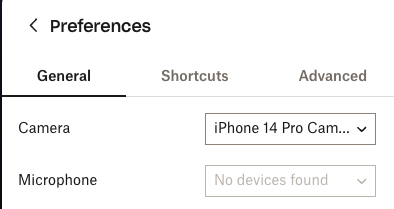
Hi, I have a Macbook Pro M1 and can't select any microphone in the Capture app. This is just a problem with this app because, with others like Loom, it
works. I tried also with an external microph...
 2 years ago
Hi francescobettio,
Thanks for reaching out! I believe you're using macOS Sonoma, which indeed has an issue currently where Dropbox Capture may not properly detect microphones. We've resolved this issue, but the fix won't be released until next week (in version 107).
Please hang tight until after version 107 of Dropbox Capture is released next week (most likely on Wednesday), and then give Capture another try after installing the update via the "Check for updates" option in the 3-dot menu in the top right corner of the app.
You can verify which version of Capture you're currently running by going to the "Preferences" section and scrolling to the bottom.

francescobettio
2 years agoNew member | Level 2
Ok, thank you so much!
Mike DBX Dropbox Engineer
2 years agoDropbox EngineerWe just launched v107.5.0 moments ago, you should be able to check for updates in the "3-dot" menu in the Capture desktop app, update, and give this another try francescobettio!
- francescobettio2 years agoNew member | Level 2
Thanks, now it works perfectly!
About Apps and Installations
Have a question about a Dropbox app or installation? Reach out to the Dropbox Community and get solutions, help, and advice from members.
The Dropbox Community team is active from Monday to Friday. We try to respond to you as soon as we can, usually within 2 hours.
If you need more help you can view your support options (expected response time for an email or ticket is 24 hours), or contact us on X, Facebook or Instagram.
For more info on available support options for your Dropbox plan, see this article.
If you found the answer to your question in this Community thread, please 'like' the post to say thanks and to let us know it was useful!


