We’re Still Here to Help (Even Over the Holidays!) - find out more here.
Forum Discussion

IsaacGaz
5 years agoExplorer | Level 4
My online -only files take up space on my Windows device. Why?
I have an 8Tb drive where I store my dropbox files on my Windows computer and despite setting all files to be 'online only' as well as going to Dropbox preferences and setting select sync to not sync...
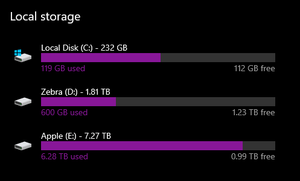
- 4 years agoThanks for the screenshot, IsaacGaz!
It seems that the Smart or selective sync changes didn't have enough space to take place, hence the error.
Can you try making some space on the hard drive you have the app installed on and then trying to apply the settings again after exiting the app?


IsaacGaz
4 years agoExplorer | Level 4
Heyo Megan,
Sorry for the delayed response. Last week I tried deleting a bunch of files on the internal drive however Dropbox still gave me the error (however I'm not sure if I completely quit and restarted Dropbox then).
Since then I uninstalled dropbox completely, and the second I did that a bunch of 'ghost' dropbox files appeared (I'm using 'ghost' cause I don't know what else to call them, my computer thinks they're taking up space even though I can't open them and they are unreadable). My computer thought these dropbox files were taking up >100Tb of space (see attached picture) which is impossible on my 8Tb drive. The size of 110Tb does make sense given it's from my business partner's shared folder and we have a lot of data on there, however to my knowledge none of those shared folders were ever downloaded or selected to be synced on this drive.
I've since then gone through and deleted most of these 'ghost' files (some 400Gb of them couldn't be deleted as the app kept crashing when I tried to do so).
I believe these ghost files (which had never showed up on my computer before) were the primary reason for my computer/dropbox to think there was space being taken up. I know this was a problem on Mac (in terms of offline files appearing to take up space), is there a way to fix this on Windows? I would love to reinstall dropbox but worry that it will take over my computer again.
Thanks for any help!

Hannah Dropbox Community Moderator
4 years agoDropbox Community ModeratorHey IsaacGaz, sorry to jump in to your conversation with Megan.
This is a strange issue to happen on a Windows computer, indeed and definitely not a known one.
May I ask, is your 'E' drive an internal or external drive?
And what happens now, if you reinstall Dropbox and switch the folder to online-only again?
This is a strange issue to happen on a Windows computer, indeed and definitely not a known one.
May I ask, is your 'E' drive an internal or external drive?
And what happens now, if you reinstall Dropbox and switch the folder to online-only again?
- IsaacGaz4 years agoExplorer | Level 4
Hey Hannah thanks for jumping in!
My E drive is internal. When I tried reinstalling dropbox and having the folders online (after a couple days of waiting for Dropbox to sync) I ran into the same error "cannot sync not enough disk space", however there's still several terrabytes of free space on the disk.
I thought for a second it might be because the disk is damaged, however when I ran some repair software it said it wasn't. I'll look more into this (maybe uninstall Dropbox and reinstall it on a different disk).Do you know if there's anything that can be done on the Dropbox end?
About Apps and Installations
Have a question about a Dropbox app or installation? Reach out to the Dropbox Community and get solutions, help, and advice from members.
The Dropbox Community team is active from Monday to Friday. We try to respond to you as soon as we can, usually within 2 hours.
If you need more help you can view your support options (expected response time for an email or ticket is 24 hours), or contact us on X, Facebook or Instagram.
For more info on available support options for your Dropbox plan, see this article.
If you found the answer to your question in this Community thread, please 'like' the post to say thanks and to let us know it was useful!


