We’re Still Here to Help (Even Over the Holidays!) - find out more here.
Forum Discussion

IsaacGaz
5 years agoExplorer | Level 4
My online -only files take up space on my Windows device. Why?
I have an 8Tb drive where I store my dropbox files on my Windows computer and despite setting all files to be 'online only' as well as going to Dropbox preferences and setting select sync to not sync...
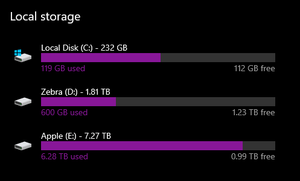
- 4 years agoThanks for the screenshot, IsaacGaz!
It seems that the Smart or selective sync changes didn't have enough space to take place, hence the error.
Can you try making some space on the hard drive you have the app installed on and then trying to apply the settings again after exiting the app?


archbitis
3 years agoExplorer | Level 3
Hello to all of you. I have a pc with 500Gb hard disk memory. All of my file are stored in the Dropbox file and they are available only on line. The size of the stored files on dropbox are 1.6 T. Is it normal to have almost full my Hard disk? I keep getting messages that is almost full (used space 475GB of 510GB). Any suggestions? Thank you all!
- Hannah3 years ago
Dropbox Community Moderator
Hey archbitis, thanks for bringing this to our attention.
If I understand correctly, you have set all your Dropbox files to be online-only, but they seem to be taking up hard drive space on your PC.
Can you send us a screenshot of your Dropbox folder's Properties showing this, please?
- archbitis3 years agoExplorer | Level 3
- Hannah3 years ago
Thanks for that screenshot, archbitis!
Can you please also check if the Dropbox application on your computer has finished syncing and is "up to date"?
You can check that by hovering over the Dropbox icon in your system tray.
Also, which version of the app do you see there?

About Apps and Installations
Have a question about a Dropbox app or installation? Reach out to the Dropbox Community and get solutions, help, and advice from members.
The Dropbox Community team is active from Monday to Friday. We try to respond to you as soon as we can, usually within 2 hours.
If you need more help you can view your support options (expected response time for an email or ticket is 24 hours), or contact us on X, Facebook or Instagram.
For more info on available support options for your Dropbox plan, see this article.
If you found the answer to your question in this Community thread, please 'like' the post to say thanks and to let us know it was useful!


