Need to see if your shared folder is taking up space on your dropbox 👨💻? Find out how to check here.
Forum Discussion

modelling architecture
3 years agoExplorer | Level 4
Sync Icons missing on Windows 11
Hi all,
Our sync icons next to the folders/files are missing on my computer. I cannot see if the files are local or online only.
I have resinstalled dropbox, and they were bac...

modelling architecture
3 years agoExplorer | Level 4
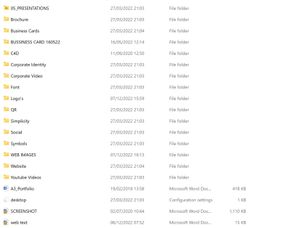
thanks for getting back to me. Please see image. this is also happening on my
laptop.

Nancy Dropbox Community Moderator
3 years agoDropbox Community ModeratorThanks for the extra screenshot, modelling architecture!
Did you recently have an OS update, by any chance?
Also, what’s the app’s current app version? You can check this by hovering over the small Dropbox icon in your system tray.
 Ioan Vlad V.3 years agoHelpful | Level 6
Any updates on this? I have the same issue with the explorer icons.
New system. Clean installation. Windows 11 Pro version 22H2.
Explorer Dropobox-specific icons missing.
Is it theme-related?
Tried with different Windows 11 themes, but with no luck.
Please further advice.
Thank you.
- Ioan Vlad V.3 years agoHelpful | Level 6
Found the solution here:
 CT2 years agoHelpful | Level 5
This just takes you to the main forum page and says "This has been archived, view related content below." That has nothing to do with the issue.
About Apps and Installations
Have a question about a Dropbox app or installation? Reach out to the Dropbox Community and get solutions, help, and advice from members.
The Dropbox Community team is active from Monday to Friday. We try to respond to you as soon as we can, usually within 2 hours.
If you need more help you can view your support options (expected response time for an email or ticket is 24 hours), or contact us on X, Facebook or Instagram.
For more info on available support options for your Dropbox plan, see this article.
If you found the answer to your question in this Community thread, please 'like' the post to say thanks and to let us know it was useful!


