We’re Still Here to Help (Even Over the Holidays!) - find out more here.
Forum Discussion

sfwrtr
9 months agoExplorer | Level 4
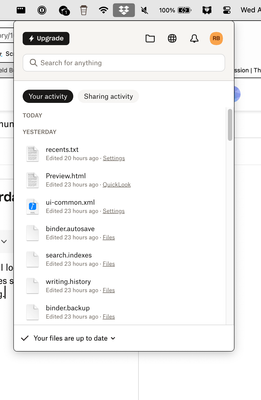
Sync results under "Your Activity" show yesterday's synced files not today's.
I can see syncing occurring with the dropbox notification icon on the Mac. When I look, syncing runs. When it completes, instead of showing what was just synced, it only shows files synced the previo...

sfwrtr
9 months agoExplorer | Level 4
I trashed Dropbox app and downloaded a new package, then installed it. It is the same build as I mentioned above. No change in behavior. I updated files using an app on the iPhone, and here's the result. Pictures are worth a 1,000 words. Note the date and time. Looks like a bug to me.
sfwrtr
9 months agoExplorer | Level 4
I found something interesting. Though I know nothing of your internals (I am a retired developer and tech support person), I noticed there are two columns in this directory display on the Dropbox site. Note that Activity has "Edited" dates that correlate to what is displayed under the Today and Yesterday columns. However, the Modified column is the actual time that the files were uploaded to dropbox. I added an arrow to point to Recents.txt which shows up under Today.
Is the code using the wrong flags to display the Today and Yesterday columns? To be precise, I did subsequently update on mobile after I finished my last reply above. This is why the files updating in the first image aren't the same as shown in the directory listing. Those were deleted in deference to the ones in the directory, which were downloaded (synced) to the Mac, but not displayed under Today.
This should be reproducible at this point by your developers.
- Hannah9 months ago
Dropbox Community Moderator
Hey sfwrtr, I hope it's okay for me to jump in here as well, I just wanted to test something with you.
If you upload a file to your Dropbox using the Dropbox app on your mobile devices, but without using any third-party apps like Scrivener, do the files appear in your sync history as normal?
- sfwrtr9 months agoExplorer | Level 4
I ended up replying to Jay's post because of a weird refresh that happened while trying to click reply on your (Hannah) post. I did not realize what happened until I went to check for a reply. What follows is an EXACT copy/paste of that post 4:37 post:
I used the Dropbox App on the iPhone to upload an image, then thought better of it and created a text file. Surprisingly, they both showed up in the Today column after about a minute, BUT...
This is so strange, I had to do screen captures. I think I found a related different bug, probably two bits of code trying to populate the Today column with different criteria. The Today column shows content, then it disappears, then it shows again. Again, a picture (three screen captures) is worth a thousand words. Note the time stamps. Each time I clicked the notification icon.
Really, all I want to see is a scrollable list of recently downloaded files. Before the current iteration of the desktop icon, this worked perfectly well. Somebody in Q/A is not dogfooding the app mobile vs Mac desktop.
- sfwrtr9 months agoExplorer | Level 4
Go ahead. Seems like a bug, but I'm betting the devs are going to look, find it, and fix it in a snap. Doesn't look complicated if it is just criteria for populating the column. Well, I hope so, anyway!
- sfwrtr9 months agoExplorer | Level 4
Um... Hannah, I am a writer, so sorry if this seems weird, but, I don't understand "I just reached out to you." Your post is in reply to Nancy but it @s me. I assume "you'll see you there" refers to an internal dev / tech support meeting and there is no action required on my part or that I am missing a notification?
- Megan9 months ago
Hey sfwrtr!
On my end, it seems like my colleague, Hannah replied directly back to you under the thread, not at Nancy.
I apologize for any miscommunication. Essentially Hannah reached out to you via email. Feel free to check your Community-linked email address, and reply back to her. That way, you can continue troubleshooting internally.
If you have any questions, let me know!
- sfwrtr9 months agoExplorer | Level 4
FYI. I almost NEVER look at my email. If you need to communicate with me, you should do it via the forum or tell me explicitly to look at my email. Also "reaching out" doesn't mean "email" for me, so the delay in response was due to that misunderstanding. HTH
- sfwrtr8 months agoExplorer | Level 4
Is there any movement on this bug? Is it scheduled for remediation with the Devs? Seems awfully quiet on my side of the screen.
- Megan8 months ago
Hey sfwrtr!
I checked your email communication with my colleague, and it seems you didn't have the chance to reply back hence the ticket was automatically closed.
In order for us to investigate further, and see why this might be happening we need to switch to email, and possibly escalate your case to our specialized team.
If you're okay with that, and you wish to continue troubleshooting there please let me know and I'll open a new email communication for you.
- sfwrtr7 months agoExplorer | Level 4
I replied. Very dissatisfied that I was ignored. I specifically noted that I don't check email almost ever, so I made an effort to answer that time. I can answer emails IF you tell me to check my email in this forum thread. Please pass that on to your developers or tech support.
Go ahead and restart the ticket. I will look for the email for the next two days.
- sfwrtr7 months agoExplorer | Level 4
Jay,
I have again replied to your email. Now that you see that it is me, can you please continue corresponding on this forum instead of using email? If there is a reason why, or a policy about this, please explain it to me here on the forum.
Waiting for you to solve this issue. I've given a way to reproduce the problem. The developers should be able to work from that.
-Robert
- sfwrtr7 months agoExplorer | Level 4
Jay or other Tech Support person,
Reopening the ticket gave me an email reply, so I assume you will indeed reopen the ticket.
I'll pass on a little more information. I turned on notifications for dropbox. I get a notification that states "You changed x files." If I click the notification on the Mac, I am taken to an Events webpage that indicates when all the syncs have taken place. It appears accurate. However, the dropbox dropdown at the top of the Mac screen still does not indicate in the Today category of Your Activity any sync has occurred. The error is still there. (It will show up in the Yesterday category after 24 hours.)
In the image, the screenshot time is 1:37 PM and the notification time is 5:00 PM.This image is what I receive if I click the notification. It correctly shows I changed files 4 minutes ago, files which do not show up in the dropbox Today category. - sfwrtr7 months agoExplorer | Level 4
I gather this can only be done through email?


About Apps and Installations
Have a question about a Dropbox app or installation? Reach out to the Dropbox Community and get solutions, help, and advice from members.
The Dropbox Community team is active from Monday to Friday. We try to respond to you as soon as we can, usually within 2 hours.
If you need more help you can view your support options (expected response time for an email or ticket is 24 hours), or contact us on X, Facebook or Instagram.
For more info on available support options for your Dropbox plan, see this article.
If you found the answer to your question in this Community thread, please 'like' the post to say thanks and to let us know it was useful!


