We’re Still Here to Help (Even Over the Holidays!) - find out more here.
Forum Discussion

sfwrtr
9 months agoExplorer | Level 4
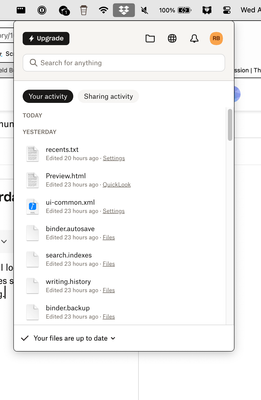
Sync results under "Your Activity" show yesterday's synced files not today's.
I can see syncing occurring with the dropbox notification icon on the Mac. When I look, syncing runs. When it completes, instead of showing what was just synced, it only shows files synced the previo...

sfwrtr
7 months agoExplorer | Level 4
Jay or other Tech Support person,
Reopening the ticket gave me an email reply, so I assume you will indeed reopen the ticket.
I'll pass on a little more information. I turned on notifications for dropbox. I get a notification that states "You changed x files." If I click the notification on the Mac, I am taken to an Events webpage that indicates when all the syncs have taken place. It appears accurate. However, the dropbox dropdown at the top of the Mac screen still does not indicate in the Today category of Your Activity any sync has occurred. The error is still there. (It will show up in the Yesterday category after 24 hours.)
In the image, the screenshot time is 1:37 PM and the notification time is 5:00 PM.This image is what I receive if I click the notification. It correctly shows I changed files 4 minutes ago, files which do not show up in the dropbox Today category.

About Apps and Installations
Have a question about a Dropbox app or installation? Reach out to the Dropbox Community and get solutions, help, and advice from members.
The Dropbox Community team is active from Monday to Friday. We try to respond to you as soon as we can, usually within 2 hours.
If you need more help you can view your support options (expected response time for an email or ticket is 24 hours), or contact us on X, Facebook or Instagram.
For more info on available support options for your Dropbox plan, see this article.
If you found the answer to your question in this Community thread, please 'like' the post to say thanks and to let us know it was useful!


