Your workflow is unique 👨💻 - tell us how you use Dropbox here.
Forum Discussion

nothanksm8
2 years agoExplorer | Level 4
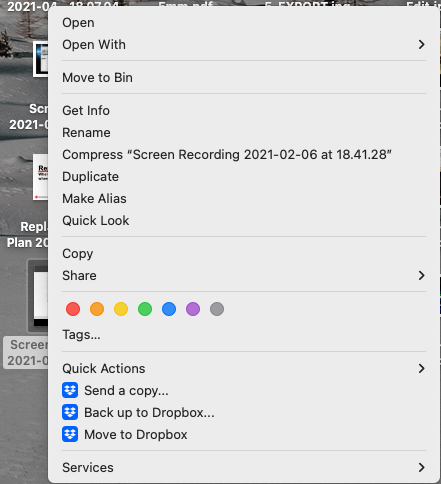
Variant on the MacOS Monterey 12.7.1, missing finder extensions issue
Hi,
There's a fairly well-known issue on MacOS where the finder extensions don't show up on right-click. It's a major problem because on older Macs if you can't quickly bring a file to the local d...

Jay Dropbox Community Moderator
2 years agoDropbox Community ModeratorHi nothanksm8, thanks for bringing this to our attention.
Does that folder have any sync icons on it, since I wasn't able to see the entire folder icon in Finder?
Is the Dropbox desktop application running and syncing normally? When you click the icon in the menu bar, what message appears on the bottom left?
This will help me to assist further!
 nothanksm82 years agoExplorer | Level 4
Thanks Jay,
No, no sync badges on folder/file icons, which DO appear on my other computer so I know what you mean:
Sync is working normally as shown below. This is right after the reinstall so it's resyncing everything:
Thanks,
James
- Jay2 years ago
Thanks for the update, just to check, could you see if you've tried these steps to see if they help to bring back the icons?
- nothanksm82 years agoExplorer | Level 4
Yes I've...
- Switched full-disk access on/off
- Signed the app out of/into my account
- Full reinstall (for DB restart)
- Removed the folder from my favourites and re-added.
About Apps and Installations
Have a question about a Dropbox app or installation? Reach out to the Dropbox Community and get solutions, help, and advice from members.
The Dropbox Community team is active from Monday to Friday. We try to respond to you as soon as we can, usually within 2 hours.
If you need more help you can view your support options (expected response time for an email or ticket is 24 hours), or contact us on X, Facebook or Instagram.
For more info on available support options for your Dropbox plan, see this article.
If you found the answer to your question in this Community thread, please 'like' the post to say thanks and to let us know it was useful!


