Need to see if your shared folder is taking up space on your dropbox 👨💻? Find out how to check here.
Forum Discussion

SirLothar
3 years agoHelpful | Level 5
Dropbox Paper has gone all weird
Anyone else had Dropbox paper go weird on them? Logged in and suddenly all the folder system and gone, I had no files showing on the main tab - and all paper files have been migrated into a document called "Migrated Paper Files". Has dropbox paper gone?
11 Replies
Replies have been turned off for this discussion
- Megan3 years ago
Dropbox Community Moderator
Hi SirLothar, I'd be happy to help!
Where are you when you try to locate your Paper files: on the paper.dropbox.com site, or when you visit dropbox.com?
Any screenshots will be helpful, so I can have visual.
Keep me posted!
 SirLothar3 years agoHelpful | Level 5
Hi Megan,
Well... apparently I've been migrated to the 2020 Paper Design... (even though it's 2023!) which looks remarkably like an old Windows 3.1 folder interface... which looks awful and makes me want to switch to something else.
Where have all the left hand files gone for example?
Where have all the left hand files gone
- Walter3 years ago
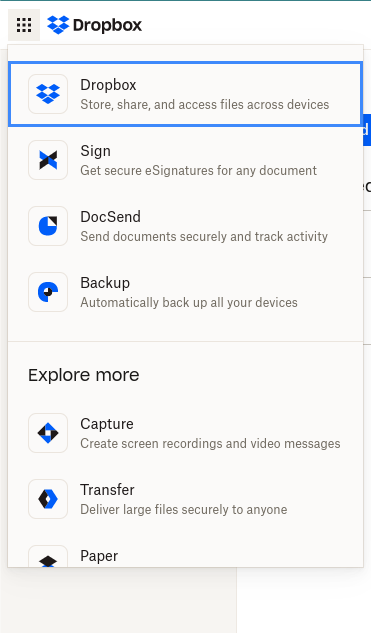
Hey SirLothar, sorry to jump in, but can you navigate to the menu button on the upper left or your page and select Paper from the options there?
It should look like this:
- SirLothar3 years agoHelpful | Level 5
Yep - and that's the page I get taken to - via the menu options you highlighted. It seems like the whole left hand menu bar has disappeared listing folders and docs.
- Walter3 years ago
Since you're on the 2020 release of Paper now, all new Paper docs will be created and organized like any other files on dropbox.com.
Are you having issues with locating any of your previously created Paper docs SirLothar?
- SirLothar3 years agoHelpful | Level 5
Main points:
* It's Feb 2023 - why have I now been moved to some sort of 2020 migration?
* All my "recent docs" disappeared
* I have no way of actually navigating into any files or folders (left hand blank grey bar)
* The only way I can find is to go to Dropbox main home (the file system itself) and then attempt to navigate an unwieldy file structure to try and find the paper files.
- Hannah3 years ago
Hey SirLothar, if you use the search bar in your "all files" page to search for your Paper docs, does it work?
- SirLothar3 years agoHelpful | Level 5
Yes - it finds them but the whole directory structure / interface is completely messed up making it a real pain to navigate or even create a folder.
My workflow is now reduced to:
- Go to paper.dropbox.com (only shows a few recently opened .paper documents - and not the 100's I had before). Empty grey menu bar on the left
- I click the grid icon in the top left, scroll all the way down and click "paper" which just brings me to the same page
- I click on one of the recent .paper files that appears (despite not wanting to open that one) and then it opens the document with 3 folders on the left. (see attached) with all my files randomly distributed in a single "migrated paper docs" folder. No way of creating any new folders. In fact... you can't even resize the window pane to fit the full length of the folder name text into it (Mac Safari)
This is either a bug in "migration" (again why is it 2023 and I've now been moved to some random 2020 migration?) or some VERY BAD design choices which have ruined it for me and makes me want to migrate to something else.
- Jay3 years ago
Hi SirLothar, we appreciate the feedback about the new Paper layout.
We take all comments seriously when looking to improve the service we provide.
- SirLothar3 years agoHelpful | Level 5But won’t provide any help or answer my questions?


About Integrations
Find solutions to issues with third-party integrations from the Dropbox Community. Share advice and help members with their integration questions.
The Dropbox Community team is active from Monday to Friday. We try to respond to you as soon as we can, usually within 2 hours.
If you need more help you can view your support options (expected response time for an email or ticket is 24 hours), or contact us on X, Facebook or Instagram.
For more info on available support options for your Dropbox plan, see this article.
If you found the answer to your question in this Community thread, please 'like' the post to say thanks and to let us know it was useful!


