Your workflow is unique 👨💻 - tell us how you use Dropbox here.
Forum Discussion

Xavier Montaner
1 year agoHelpful | Level 5
I'm working with Adobe Lightroom Classic and Dropbox doesn't sync some .db files
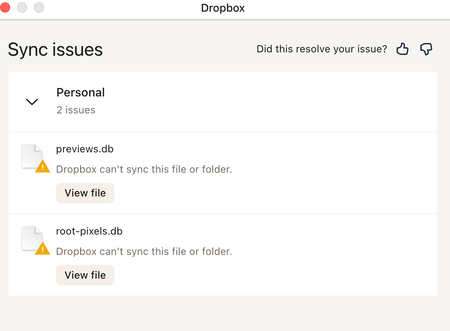
Hi everyone. Using Lightroom Classic and Dropbox. I am getting messages from Dropbox that some preview files can sync. See attached. Also when I sync again folders with my computer thumbnails are...
 1 year ago
Hi everyone!
Quick update:
The data transfer was successful. I deleted the old data, and now everything is working again with Lightroom - the error message about synchronization issues is gone.
Thank you very much for the help and have a great weekend.
Best regards,
Carina

Megan Dropbox Community Moderator
1 year agoDropbox Community ModeratorHey Xavier Montaner, it sounds like the db files are database files, right?
Keep in mind that we generally don't recommend that people sync live databases with Dropbox.
Most databases have remote access methods anyway, so you don't need to sync the live database. You can sync saved snapshots, however, with no issues.
That said, you can use Dropbox to share the data, but you need to take great care and understand how file syncing works.
Most programs create a "file lock" on any file that they are using, and this lock will prevent Dropbox from syncing the file. In some cases you must fully quit the application before Dropbox can sync the data. You must then make sure Dropbox has finished syncing before trying to access the file from any computer.
As for the folder "Group containers" it looks like you could empty it without affecting Dropbox.

Xavier Montaner
1 year agoHelpful | Level 5
Thanks. Makes sense what you say. Saying that, I have been using Dropbox and Lightroom for years without any issues until Dropbox made the upgrade. I am not an expert person when it comes to computers and software. I am also pretty sure that other users are experiencing issues using both. Considering the massive amount of users that use Adobe Lightroom, if you and Adobe could find a way to make things easier, you would get on board many more customers.
About Integrations
Get help with third-party integrations from the Dropbox Community.
The Dropbox Community team is active from Monday to Friday. We try to respond to you as soon as we can, usually within 2 hours.
If you need more help you can view your support options (expected response time for an email or ticket is 24 hours), or contact us on X, Facebook or Instagram.
For more info on available support options for your Dropbox plan, see this article.
If you found the answer to your question in this Community thread, please 'like' the post to say thanks and to let us know it was useful!


