Your workflow is unique 👨💻 - tell us how you use Dropbox here.
Forum Discussion

Rejith Varma
4 years agoExplorer | Level 4
Issues with Salesforce and Drop Box integration
I connected DropBox to Salesforce but it is not working as intended. We do have a DroBox business account
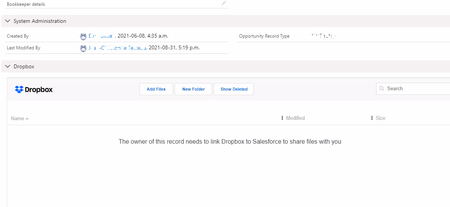
When we try to add files to Dropbox from Opportunity it shows an error like this ( scre...
- 4 years agoHey Rejith Varma, thanks for reaching out to our Community.
Have you checked if your Dropbox for Salesforce is up to date? If it's not, you can update it, using the info here.
Also, has the owner of the Opportunity connected Dropbox to Salesforce on their end, like the error says?
Keep me posted!

Rejith Varma
4 years agoExplorer | Level 4
Hi Hannah,
It is now working as expected. Appreciate your valuable support.

Hannah Dropbox Community Moderator
4 years agoDropbox Community ModeratorThat's perfect, Rejith, thanks for the update!
Happy to see you're now able to use the integration as normal.
If you ever need anything else, please make sure to let us know!
Happy to see you're now able to use the integration as normal.
If you ever need anything else, please make sure to let us know!
About Integrations
Get help with third-party integrations from the Dropbox Community.
The Dropbox Community team is active from Monday to Friday. We try to respond to you as soon as we can, usually within 2 hours.
If you need more help you can view your support options (expected response time for an email or ticket is 24 hours), or contact us on X, Facebook or Instagram.
For more info on available support options for your Dropbox plan, see this article.
If you found the answer to your question in this Community thread, please 'like' the post to say thanks and to let us know it was useful!


