Your workflow is unique 👨💻 - tell us how you use Dropbox here.
Forum Discussion

doppyjoe
2 years agoHelpful | Level 5
Logic Pro files disappearing
I got a new macbook (M2) and migrated from my old macbook (2019 intel). Initially I set all of my dropbox folders to online only so I could then manually select what I wanted to keep local. ...
doppyjoe
2 years agoHelpful | Level 5
Nancy Hi,
This issue started when migrating to the new mac.
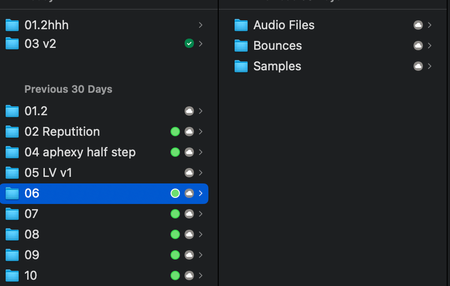
No issues with any other logic projects in or out of dropbox, only the ones that have disappeared (see image with folder '06' for example).
I had the latest version of dropbox on my last mac, but for some reason when migrating to the new one from that backup I seem to be back on the version of dropbox before that update.
I've not updated it as I do not like how the update was randomly changing files to online only without my permission and would no longer allow me to access logic file via the 'recents' section when right clicking on the app.
But I imagine you're going to suggest to do the update? ; D

Elss
2 years agoExplorer | Level 4
SAMEEEE!!! Did you solve this? I'm not even given the option to update to the Mac version.
About Integrations
Get help with third-party integrations from the Dropbox Community.
The Dropbox Community team is active from Monday to Friday. We try to respond to you as soon as we can, usually within 2 hours.
If you need more help you can view your support options (expected response time for an email or ticket is 24 hours), or contact us on X, Facebook or Instagram.
For more info on available support options for your Dropbox plan, see this article.
If you found the answer to your question in this Community thread, please 'like' the post to say thanks and to let us know it was useful!


