Your workflow is unique 👨💻 - tell us how you use Dropbox here.
Forum Discussion

doppyjoe
2 years agoHelpful | Level 5
Logic Pro files disappearing
I got a new macbook (M2) and migrated from my old macbook (2019 intel). Initially I set all of my dropbox folders to online only so I could then manually select what I wanted to keep local. ...
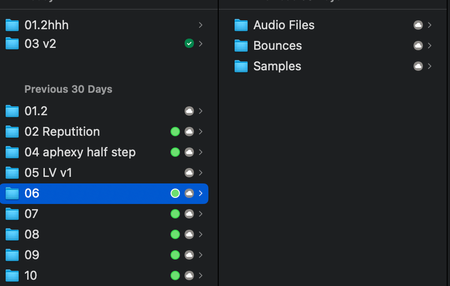

Elss
2 years agoExplorer | Level 4
Hi! This is copied from a user who posted above that I was thanking... I think it's Explorer. But anyway this was his fix -- temporary but it gets your files that were held hostage off of dropbox.

Gomba
2 years agoExplorer | Level 4
oh, I already tried this one, but most of my session files that gone lost / are corrupted have more than 4gb (Software / pre recorded instruments for live concerts, and some concerts recorded live multitrack) and seems like dropbox only allows to download fat32 file size limit online, because the tar.gz file usually tops on 3.somethin gb in size.
And when I unpack them logic says it`s corrupted and won't open.
- Elss2 years agoExplorer | Level 4
It's really crazy cuz it worked on many of my files but some stayed as folders and therefore it would not work. I think the key is first try on an actual file that you know might be a simpler file and see if it works. It will not work if you can only get to the folder. I hope you're able to salvage things... this has been beyond stressful and I only took a handful of files out that I know I need to bounce stems to and continue working on. If they don't fix this soon, I'l be finding another service to hold my files.
- Elss2 years agoExplorer | Level 4
I'm not sure if this will help your problem but I'm sure it will help others here but I wrote to dropbox support after they escalated my issues and I asked for access to get back dropbox for Mac since I had it on my last computer. I then installed it on the new computer I have and all the files that I have checked so far are finally back. Hopefully they all are.
- nicknewhouse2 years agoExplorer | Level 4
Wait what do you mean Dropbox for Mac? I'm using Dropbox on my Mac as it is--are you talking about an older version of the software?
- Elss2 years agoExplorer | Level 4
There is a beta dropbox for mac that I had installed on my old laptop that died last week. I then had to install everything fresh on my new MacBook Pro but dropbox was holding many of my files on their server that I couldn't access locally nor by downloading as it would say it wouldn't open the files into logic even when downloaded. Once I got a link from support to go back to the new Mac specific version of dropbox, I could get my files back. If you were not on it yet, it will prob not fix your problem. I don't know but honestly I liked the original dropbox better but had no choice since migrating prior I'm now not able to not be migrated.
About Integrations
Get help with third-party integrations from the Dropbox Community.
The Dropbox Community team is active from Monday to Friday. We try to respond to you as soon as we can, usually within 2 hours.
If you need more help you can view your support options (expected response time for an email or ticket is 24 hours), or contact us on X, Facebook or Instagram.
For more info on available support options for your Dropbox plan, see this article.
If you found the answer to your question in this Community thread, please 'like' the post to say thanks and to let us know it was useful!


