Need to see if your shared folder is taking up space on your dropbox 👨💻? Find out how to check here.
Forum Discussion

N_11
2 years agoExplorer | Level 3
Disconnect and cancel any connection between my computer/email and Dropbox
Hey,
I would like to disconnect and to cancel any connection between my computer / email and shared dropbox folder (I am not the owner of the folder). I want to be sure that the files will not be ...
- 2 years ago
Hi there N_11 - thanks for using Dropbox and welcome to the Community!
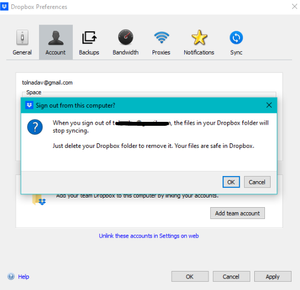
Unlinking your account from the desktop app's preferences won't delete any of the files stored in your Dropbox account.
Once you click on the OK option, you'll be logged out from your Dropbox account and your Dropbox folder will be a local copy of the files you had stored in your Dropbox account.
I hope this helps!

Walter Dropbox Community Moderator
2 years agoDropbox Community ModeratorHi there N_11 - thanks for using Dropbox and welcome to the Community!
Unlinking your account from the desktop app's preferences won't delete any of the files stored in your Dropbox account.
Once you click on the OK option, you'll be logged out from your Dropbox account and your Dropbox folder will be a local copy of the files you had stored in your Dropbox account.
I hope this helps!

sarobaali
2 years agoNew member | Level 2
if the files are saved on cloud, then disconnecting wont be problem. But if you didnt synchonize local data with cloud, then I think you will not be getting your data.
About Settings and Preferences
The Dropbox Community is here to help if you have questions about your account settings and preferences. Learn and share advice with members.
The Dropbox Community team is active from Monday to Friday. We try to respond to you as soon as we can, usually within 2 hours.
If you need more help you can view your support options (expected response time for an email or ticket is 24 hours), or contact us on X, Facebook or Instagram.
For more info on available support options for your Dropbox plan, see this article.
If you found the answer to your question in this Community thread, please 'like' the post to say thanks and to let us know it was useful!


