Your workflow is unique 👨💻 - tell us how you use Dropbox here.
Forum Discussion

MH19
8 months agoHelpful | Level 5
How do I stop the Dropbox desktop app from opening whenever I start my computer?
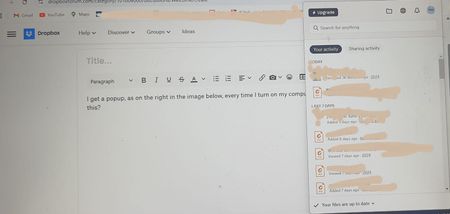
I get a popup, as on the right in the image below, every time I turn on my computer. How do I stop this?


Nancy Dropbox Community Moderator
8 months agoDropbox Community ModeratorHey MH19! If you follow Walter’s suggestion and turn the automatic startup Off and then On again, does the issue persist?

MH19
8 months agoHelpful | Level 5
Thanks for your suggestion Nancy! Yes, I tried that and the problem does persist.
- Hannah8 months ago
Hey MH19, I hope it's okay for me to jump in here as well.
Does the system tray window remain open even if you click out of it?
Can you also hover over the small Dropbox icon in the system tray and let us know the Dropbox app version you're using?
- MH198 months agoHelpful | Level 5
Thanks Hannah! Yes, sure, all help is welcome.
It's version 226.4.5094
I can click out of it, but part of what makes it bothersome is there's no "X" button. To get out of it I have to take two or three steps. Not such a big problem given the state of the world these days, I know. But maybe one that I can find a solution to?- Rich8 months ago
Super User II
MH19 wrote:
To get out of it I have to take two or three steps.
Usually you only need to click once anywhere outside of the window to close it. Does that not happen?


About Settings and Preferences
The Dropbox Community is here to help if you have questions about your account settings and preferences. Learn and share advice with members.
The Dropbox Community team is active from Monday to Friday. We try to respond to you as soon as we can, usually within 2 hours.
If you need more help you can view your support options (expected response time for an email or ticket is 24 hours), or contact us on X, Facebook or Instagram.
For more info on available support options for your Dropbox plan, see this article.
If you found the answer to your question in this Community thread, please 'like' the post to say thanks and to let us know it was useful!


