Your workflow is unique 👨💻 - tell us how you use Dropbox here.
Forum Discussion

MH19
8 months agoHelpful | Level 5
How do I stop the Dropbox desktop app from opening whenever I start my computer?
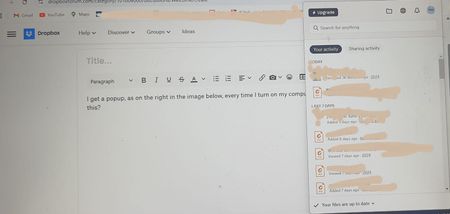
I get a popup, as on the right in the image below, every time I turn on my computer. How do I stop this?


Neal Community Manager
8 months agoCommunity ManagerHi MH19,
I just wanted to touch base with you again and let you know the team is currently addressing this issue.
In the meantime are you still experiencing this behavior? I just want to double check. I'll be keeping an eye on this issue for any updates I can share with you.
 MH197 months agoHelpful | Level 5
Thanks Neal! Yes, it's still happening.
- Neal7 months ago
Thank you for confirming!
I just wanted to double check if there was any changes in behavior that I could pass on to the team. As I said, this is currently being worked on and I'll let you know of any updates as soon as I hear them.
- Neal7 months ago
Hi MH19,
Can you confirm if you're using the most up to date version of Dropbox? I believe a fix should be rolled out for this.
- MH197 months agoHelpful | Level 5
Yes, I've got 228.4.5567 installed
About Settings and Preferences
The Dropbox Community is here to help if you have questions about your account settings and preferences. Learn and share advice with members.
The Dropbox Community team is active from Monday to Friday. We try to respond to you as soon as we can, usually within 2 hours.
If you need more help you can view your support options (expected response time for an email or ticket is 24 hours), or contact us on X, Facebook or Instagram.
For more info on available support options for your Dropbox plan, see this article.
If you found the answer to your question in this Community thread, please 'like' the post to say thanks and to let us know it was useful!


