Your workflow is unique 👨💻 - tell us how you use Dropbox here.
Forum Discussion

MH19
8 months agoHelpful | Level 5
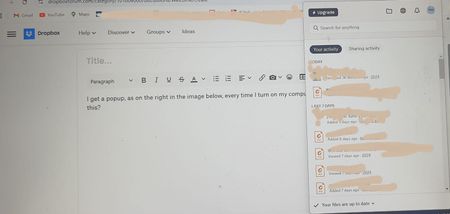
How do I stop the Dropbox desktop app from opening whenever I start my computer?
I get a popup, as on the right in the image below, every time I turn on my computer. How do I stop this?

MH19
7 months agoHelpful | Level 5
It happens every time I open my computer. No need to ask me any more questions, you have all the info. Thanks.

Walter Dropbox Community Moderator
7 months agoDropbox Community ModeratorThanks for clarifying that for us MH19
Since there's an updated version of the Dropbox desktop app, could you give it a go from this page directly and let us know if it improved matters at all?
- MH197 months agoHelpful | Level 5
Thanks. Sure I can do that. Why wouldn't my desktop app be updating automatically though?
- MH197 months agoHelpful | Level 5
To the best of my knowledge, I've done these things. I closed dropbox as well as my computer multiple times. Is there any other reason it wouldn't be automatically updating?

About Settings and Preferences
The Dropbox Community is here to help if you have questions about your account settings and preferences. Learn and share advice with members.
The Dropbox Community team is active from Monday to Friday. We try to respond to you as soon as we can, usually within 2 hours.
If you need more help you can view your support options (expected response time for an email or ticket is 24 hours), or contact us on X, Facebook or Instagram.
For more info on available support options for your Dropbox plan, see this article.
If you found the answer to your question in this Community thread, please 'like' the post to say thanks and to let us know it was useful!


