Your workflow is unique 👨💻 - tell us how you use Dropbox here.
Dropbox Backup
687 Topics
I deleted my Dropbox Backup but files still are still accessible through the 'Recents' filter
Hi, In my main account, I've deleted a Backup (proper Backup; a computer that was registered there). Today, when exploring the "Recents" filtering on the Home page, I see the name of that computer, folders and files within are still there! I can even open and visualize them. Even though they were supposed to be wiped; when I delete the whole Backup and confirm, they are not supposed to be stored under the retention period. Also, I don't see them anywhere else; not in Deleted Files; not in dropbox.com/backups, so there is no way to restore them or properly delete them. When selecting those files in questions from the Recents filter, the only options I get are "File Info" and "File Activity", so Dropbox "knows" that those files are supposed to not exist anymore and, hence, it won't let me do anything. When you right click other; existing files there, you get all the options like Open, Share, Delete, etc. In summary, this is clearly a (serious) bug: Those files should have been completely removed when I deleted the Backup They shouldn't show up in Recents list as a leftover Serious privacy issue, as not only they show there as some useless remnants, I get a thumbnail preview of them and I can double click to open! You are clearly storing my data I chose to delete! As a side note, why can't we clear or selectively remove items from the Recents list; nor on the Web or the App? I've seen some posts from years ago. Is this ever going to be addressed? All the other main players (Google Drive, OneDrive, etc.) allow that, so why do I have to see stuff I don't want in my Recents filtering "forever" (or until they get cycled out; which I couldn't find any documentation on how many files you keep there) Thanks.109Views0likes8Comments
Boxifier Status
Hi All, I've been following the Boxifier threads as I'm not having much luck emailing the support team directly. Christine at Boxifier has been helping me on and off since June of last year but Boxifier has not worked for me since then, yes I have the new cloud sync problem. Last I heard from Christine was right before the new year and I have reached out a few times since then with no response. They have been very helpful when active and even helped me with a license problem. But I'd like to have some response when I ask a question and some status on when this is going to be finally fixed so I don't keep losing valuable files from a broken syncing process. My regular Dropbox folder isn't synching either because of this. Any help and update would be greatly appreciated. Razvan Boxifier do you have any update? Thanks50Views0likes2Comments
Recovering files after a Mac-ScanSnap-Dropbox fumble
This information is not required, but it makes it easier for our Community members and support team to help you. Device MacBook Pro i9 Operating System/Browser (if using the web) macOS Tahoe 26.3 Chrome v145.0.7632.77 Dropbox App Version v243.3.6895 Scanner Snap ix500 ScanSnap Home v2.23.1(2) Question or Issue Deep plumbing alert! I use a Fujitsu ScanSnap ix500 scanner with my MacBook Pro. It appears I may have made the mistake of changing a folder name via Finder when that folder happened to be the ScanSnap Home (SSH) folder, which is the destination folder for scanned documents. That folder is also within Dropbox. For example, the original SSH folder was [Users/me/Dropbox/My Inbox] and the [My Inbox] folder name was changed in Finder to [My Scans]. The name change was done recently, and with plenty of my recovery period remaining. There is no longer any record of files in the now-renamed [My Scans] folder in Dropbox (online or on my device) before the date of the folder name change. There is nothing in the deleted files folder (online or on my device), including a reference to the folder name change, so I am not able to view/restore as I normally would with deleted files. However, the files (or at least thumbnails of) can still be seen in the ScanSnap app but they cannot be accessed, as an error message comes up showing the doc with the old [My Inbox] path is not accessible. Maybe the question is, how can files (20k+ files) get removed from Dropbox without any trace or record of those files ever being there? Any help or insight would be appreciated.2Views0likes0Comments
Be able to change Dropbox backup folders names on individual accounts
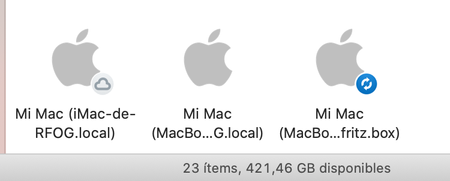
Add possibility of rename Backup folders. If you have only one computer, it go fine, but if you have more than one, it ends being very confussing. Due iCloud Drive issues, I've changed all of my Macs "synchronized" Desktop and Documents to Dropbox. However, take a look to the picture: It is very difficult to guess what is what. With the possibility to rename them, I could have named "My iMac", "My MBP 13", "My MBP 15". Very easy to see what is what. (As a workaround, we can change to detail view, but could be more easy for all of us be able to change the names).23KViews82likes89Comments
Dropbox is full of a backup, but I cannot find the backup anywhere.
Where can you find and deselect the backup dropbox is making. I don't want the dropbox making backups. I only use it to share some files. If u go to preferences / back-ups I don't see any backups and yet there is backup space used in the dropbox.34Views0likes1Comment
Dropbox not syncing to Apple folders (Desktop, Documents, Downloads)
Device MacBook Air M4 Operating System/Browser (if using the web) Sequoia, Tahoe Dropbox App Version (if using the app) 241.4.4853 Dropbox Plan Family Question or Issue My files are on Dropbox online. I now need to download them to my Mac (I've tried this on both a Tahoe and a Sequoia machine). Although the Mac already has Desktop, Documents and Downloads folders, the Dropbox app creates a new parallel set of (virtual) folders under the same names, residing in the Dropbox folder (~/Library/CloudStorage/Dropbox. In the past Dropbox used to sync with the existing Apple folders, but that's not been the case since a few OS X/Dropbox versions. It is my understanding that the parallel folders are supposed to be there, but Mac would mirror these, to make it look like they are in the `Apple folders. It makes no difference whether either File Provider and/or Backup is on or off. How do get rid of this double folder issue?31Views0likes1CommentTell Us How You Use Dropbox
No two people use Dropbox in exactly the same way. Some of you rely on it every day for work, others for school, creative projects, or keeping life organized - and we love that. We’d love to hear how you’re using Dropbox today - is it something you use once in a while, is it part of your day to day, are there any features you can’t live without? What workflows have you built that save time or reduce friction? And where do you see opportunities for us to do better? Your tips, ideas, and honest feedback really help us to make sure we can share useful tips, and they help other community members discover new ways to get more out of Dropbox too. Share your experience, favorite features, or suggestions in the comments below. Your voice truly helps shape the future of the Dropbox community 😁 The Dropbox Community Team2.1KViews3likes11CommentsDropbox says I have 7.9GB of backup files, but I don’t know how to find them and delete them.
Dropbox plan free Device iPad, iPhone, MacBook Pro Question or Issue The free plan gives me 2gb of storage. Dropbox says I am using almost 8gb, and that almost all of it is in backups. I’m not aware of using any backup features. And I can’t find the backup files. How can I delete all the backup files so I can use my account again?59Views1like2Comments
Impossible to Restore an External Drive Backup
Dropbox is an absolute joke! If you back up an external drive and that drive crashes, congratulations — you’ve just discovered that Dropbox “Backup” is basically useless. You cannot restore the backup to a new drive. Let that sink in. A backup service that can’t restore to new hardware... Yeah, funny, I know. Your only option? Crawl to the web interface like it’s 2005 and manually download your own data. And it gets worse: you can’t even download large folders. Try it and you’ll be slapped with “too many files” or ZIP limit errors. So instead of restoring a drive, you’re forced to download a few folders at a time, over and over, for thousands of folders. Absolute insanity. - Easy for Dropbox support clowns to say, just do it in small batches... Right. You do understand that some of your clients have subfolder within subfolders where some of those folders have large volumes of data? Oh, duh, just download one folder at a time. OK Dropbox Support Hero, how do I reliably rebuild all this manual intervention without accidentally losing valuable data? Come on guys! You should have a restore drive option that mirrors the data on your useless server with the new drive. Dropbox Backup is not a backup service — it’s a data hostage situation. It’s fine for a couple of documents, but if you trust it with real data, you’re asking for pain. I paid for 2TB and got a masterclass in how not to design a backup product. If you value your time, your sanity, or your data: stay far away from Dropbox Our company has almost 40 team members, we are ALL moving to Google Drive the moment our paid subscriptions end.143Views0likes6Comments