We're making some changes to the Dropbox Community 👩💻 - Find out more here.
Dropbox Capture
57 Topics
Dropbox capture: we need to keep it active
I never comment in forums, but the recent announcement of discontinuing dropbox capture was disappointing the very least. We gone into great lengths in training out team in using this user friendly tool, that we strongly believe Dropbox should reconsider.574Views9likes10CommentsHow we use Dropbox: Youcef Captures the moment
We love to share stories of how our Dropboxer colleagues use Dropbox. Whether you’re using Dropbox for project management or to organize photos, it’s always handy to share tips and advice. We all have slightly different roles, and everybody has different preferences when it comes to workflows. You might have seen YoucefDropbox on the Dropbox Community before, but we’re his biggest fans and he is a Dropbox Capture expert so I asked him to share some info on how he uses Dropbox. How I use Dropbox Capture in my day to day work I use Dropbox Capture often to explain things quickly to my team and ensure everyone is on the same page. Capture has many useful features, like creating GIFs in no time or adding markup while recording a video. But there is one that I particularly love that many don't know about yet, so check out my capture below to discover it. We love to hear about useful little tips like this, they so easily become part of our daily routines and save a lot of busy work. Do you have any of those helpful little tips to share? Leave it in the comments below! And if you’re new to the tool, discover how to get started with Dropbox Capture in our simple guide.7.5KViews6likes5CommentsDropbox Basic: Learn the Basics
If you are reading this, chances are you are new to Dropbox. Welcome! Many of us begin our Dropbox journey with a Basic Account, which has so many perks, and of course, it is free! The basics of your Basic account: Users and Space The Dropbox Basic account allows for 1 user. This means you are the only person that can use this account. But don’t worry, one user doesn’t just mean one device - you can have 3 different devices connected to your Dropbox account. I connected my dropbox account to my phone, tablet, and laptop. When I was in Ghana, I was able to access all of my files from my phone, and to upload some photos. Want to learn more about connecting your mobile devices? Discover how to make the most of your mobile access to Dropbox. Using your Dropbox Basic account: So to get started, you can upload almost any file type to your Dropbox account and keep your important files safe! Whether it’s music files, pictures, media, documents, simply upload and you can access your files anytime, anywhere! With a Dropbox Basic plan you have 2GB of space to use. And of course, we keep your files safe! Dropbox uses multi-factor authentication to ensure that all of your files are secure. Check out how Dropbox uses encryption to provide security for your files. When I received my first multi-factor message I said to myself, “Come on Safety”. Dropbox Basic tools you might not know about: The tools within Dropbox are the real secret sauce. Here are some Dropbox features and products you might not know about, check them out below and find out if they can help you to make plans, organize files and save time! Dropbox Paper is a collaboration tool with endless possibilities! Charts, headings and formatting is made easy with one click, LITERALLY. This program is great for creating proposals, project plans and just quickly taking notes. The best part of it is that it takes up very little space in your Dropbox account. Trust me, I make paper docs for all of my todo lists, to plan family trips and to organize any personal projects. Paper has truly become one of my favorite products to use. HelloSign allows you to send 3 documents for eSignature per month. In the digital world we live in, this is a perfect way to get a signature from someone you may not see in person. Explore HelloSign, a simple and easy way to get documents signed securely online. I recently needed a contractor to sign a document that I drafted to fix my home and the document was signed and sent back to me within minutes. And of course, the signed docs are safe and secure too! Dropbox Capture is a tool used to Capture the attention of the person you‘re chatting to. With Capture you can share your thoughts with screenshots, GIFs, or simple videos recorded right on your screen. The upside is that you can clearly say what you mean without scheduling another meeting. Learn more about how to use Dropbox Capture. Having a Dropbox Basic account is more than just a space to store your information. Use Dropbox to manage and organize your files, whether it’s for a project, sharing memories or connecting with others. 😁 Will you use these tips to make the most of your Dropbox Basic account?8.9KViews6likes1Comment🌟🤝Community Spirit Badge 🤝🌟
Hey everyone! 🌟 It’s Theresa here. You’ve probably seen me hanging out in the Community, jumping into conversations and joining discussions (if you haven’t seen me before, well, hello 👋). And while doing that, I’ve noticed something pretty great (well, we all have here on the Dropbox Community Team) – so many of you are out here making this Community an amazing place. Whether you're helping others, sharing useful tips, or just bringing good vibes ✨, your contributions really stand out. To recognise and celebrate this, we’ve created a brand-new badge… This badge is all about celebrating the people who make this space feel like home. It’s for those who do more than just answer questions – the ones who offer a helping hand 🤝, share great tips 💡, and keep the good vibes flowing. Whether you're solving tricky problems 🧩, sharing useful resources 📚, or just making the Community a fun place to hang out 😃, we see you and we appreciate you. The Community Spirit Badge is a one-time award 🏆, so if you earn it, you know you're doing something special. It's a little extra recognition for those who truly bring the Community to life. We’re so excited 🎊 to launch this new badge and can’t wait to start recognizing the amazing individuals who truly bring the spirit of this Community to life. And if you spot someone who you think deserves the Community Spirit Badge, don’t hesitate to tag me Theresa within the thread. T 💙 (Dropbox Community Manager)856Views5likes0Comments
Dropbox Capture screen recording skips and buffers upon playback
When I do a screen recording using Dropbox Capture (v94.0.3), the resulting video skips and buffers upon playback. It's unwatchable. I have tried waiting for the full video to load before playing it - that does not help. I've uninstalled and reinstalled Dropbox Capture - that doesn't help. Cleared my cache too, that didn't fix it. I'm using Windows 11 on a PC, and other screen recording software does not do this (Loom, the native Microsoft screen record software, etc). The capture feature works just fine for still images so there is only a problem with screen recording. I've been using Dropbox Capture for a few months since it was in beta--this was not a problem about a month ago. Anyone have a solution?11KViews5likes47Comments
Open Feedback to Dropbox
Dropbox has the potential to make a huge leap forward not by inventing something radically new, but by strengthening and bundling the tools it already has. Here’s what could truly make the difference for many professionals and businesses: Reintroduce and expand Dropbox Capture. Today, video and screen recording is a daily need for teams, customer support, and remote collaboration. This tool should not disappear, it should be stronger. Enhance and integrate e-signature features. Make them more seamless, reliable, and part of the core Dropbox experience. For the Italian market, enabling authentication with the CIE (Electronic Identity Card) would make the application a must-have and extremely interesting. Boost DocSend, review its interface and make it more user-friendly. The tool is powerful, but its full potential emerges only when it’s intuitive to use and included in an accessible bundle. Significantly increase file sync capacity. Many users complain about the ~500,000 files (or performance decline oltre i ~300.000 file sincronizzati sul computer) limit in Dropbox’s desktop app The winning move would be to create a unified, accessible bundle that combines these tools at a fair price. This would bring clear, tangible value to users and set Dropbox apart from competitors in a meaningful way. Sometimes innovation is not about the next big thing. It’s about making what you already have indispensable.372Views3likes9Comments
How to switch from .png to .jpeg when screenshot saves to Dropbox
Hello, Dropbox community I am a big fan of Dropbox Caption and use it on a daily basis. I would like to know if there is a way to change the format of captured screenshots? I would like to have them saved as a jpeg. Please let me know if it is possible P1.6KViews3likes4CommentsDiscover Dropbox Transfer in video!
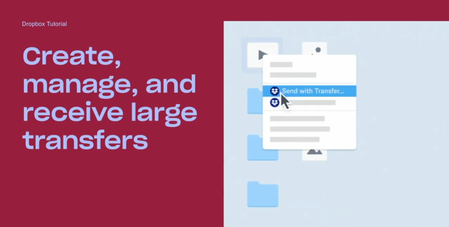
Hi beloved Community! Has any of you used Dropbox Transfer, our feature allowing you to share large files to anyone, Dropbox user or not? We put together a video featuring Madison, one of our Product Marketing Manager who built this amazing feature, and some of our users who will explain themselves, in their own words, how Transfer works! Check Dropbox Transfer video here! Did you like this video? And would you like to see more lightweight, educational videos on Dropbox features in the future?1.6KViews3likes0CommentsWhat Do You Want to See on the Community?
Hey everyone, my name is Emmet and I’m in charge of the Experience for our users on the Dropbox Community. The Community Team is working on improvements to the Community and your voices are important to this conversation. We want to know what you think we’re doing well and what you feel we could be doing better. When giving feedback, please be as detailed as possible. The more information we have the better. Your experience can be about any part of the Community experience from creating an account, posting a thread, receiving emails etc. Please feel free to let us know what you think about all our sections and any features/areas of the Community you would like to see in the future. Also, while we do work closely with other areas of the support experience, this thread is specifically about the Dropbox Community. We pass on feedback about other areas of support to those teams as we receive them, but the focus of this thread is on the Community experience.1.8KViews2likes4Comments
How we use Dropbox: Paul
We’re back with another edition of ‘How we use Dropbox’ and I have to say, I’m really excited about this one. You’ve heard us talk about working from home, and Dropbox is a remote first company but we recently for back into the office, now known as the Studio - and the super heroes that updated the space and got it ready to welcome us back includes Paul. Paul and the team tackled a mountain of work to make that a reality, and they used Dropbox to do it, so here are some of the ways they did that, in Paul’s own words. Once everyone was set up to work from home and we were starting to understand the new normal, we started planning the office 2.0. From October 2020 my team and I were working on the Dublin Studio Project. Throughout this project, we had multiple workshops, kicking off with a group session featuring some internal and external stakeholders to help define the look and feel of our studio. We also planned our furniture itinerary and planting strategy via a virtual Miro Board, which was integrated with Dropbox so we all had access to the most up to date files and could work collaboratively in realtime, and asynchronously too. Once the decisions were made, we then used Dropbox Paper to transfer this all of this information into tables where we could track orders and quantities etc. I love how easy it is to move things around in the tables on Dropbox Paper, and our external vendor was able to edit and comment on the table and let us know of any tweaks that need to be made. Then as the furniture arrived and we organized the new space, we were able to tick off the sections one by one until we were ready to open! A lot of our role requires helping employees feel safe when they are at work and creating content to convey our health and safety policies. For example have used a Dropbox Capture to create our mandatory fire marshall training. We’ve also used this tool to help create video content for region wide meetings. Capture is fast, intuitive and a really smooth way of creating great content. We know as much as the next person that too many process docs can lose you! We use Dropbox for so many things in the process of running the day to day - planning events, managing files, working with all the different teams who come in and out of the Dublin Studio and I wouldn’t have it any other way! Having seen the proof of all this excellent work, I have to say, I am Paul (and the team’s) number one fan, and I love to see how Dropbox was used for something so tangible! Have you ever used Dropbox to manage a project with visible results before?1.9KViews2likes1Comment