We’re Still Here to Help (Even Over the Holidays!) - find out more here.
Windows
689 Topics
Hidden Dropbox logs folder is stuck, continually growing bigger, now beyond 300GB
Application Affected (Dropbox app & backup) Device (Optiplex 3060 i5-8500, 16GB RAM, 500GB SSD) Operating System/Browser (if using the web) (Windows 10) Dropbox App Version (if using the app) (236.4.5918) Question or Issue For the past few days, a folder called "log" within the dropbox system folders, specifically "C:\Users\username\AppData\Local\Dropbox\logs" is constantly growing and growing.. occupying my entire hard disk! please help.. Not sure if they're at all related, but the following points have recently changed in this computer: 1. I bought a new SSD for backup purposes, which I have set to backup by Dropbox It's 2TB, 900GB of which are occupied, it's connected over USB and it doesn't seem to actually backup.. 2. I removed Avast and installed Bitdefender instead. I was running Malwarebytes and Spybot in parallel, though these have now been removed. I have noticed that the Tray Assistant almost maxes out my CPU use, as well.. Any ideas of how to troubleshoot/resolve this? Many thanks!650Views2likes28Comments
How to back up my Dropbox folder on an external drive?
Running Windows 11 Pro. I recently re-installed Dropbox to retrieve files still stored on the cloud. The default install put the folder location "C:\Users\michaelmunson\Dropbox" I attempted to change the folder location by going to Preferences > Sync > Dropbox folder location. I changed the location to the external drive where I wanted it to be. After a LONG time, there was a quick pop up error message that said that not all files could be transferred. (I dont know which ones and can't find a log with details.) When I open file explorer, I am still seeing dropbox in the original location (c:\users\) AND the new location (d:\dropbox\). When I check back in preferences under sync, the dropbox folder location is still showing the original (C:\users\). When I tried to do the process again to move it to the D drive, a pop up box noted that there was already a desktop.ini file on the D drive and it could not move the files. Any idea of how I can get dropbox to show up ONLY on the external drive? I ONLY want to be able to download ALL of the content to the external drive. I dont' need it to sync and don't plan on having this as a dynamic file location with new or changing files. This is simply a back up of prior files. Thanks for any help. michael12Views0likes1Comment
Are log files safe to delete on Windows?
There's over 200GB of 'log' files on my computer under: [Users/[user]/AppData/Local/Dropbox/logs] My Dropbox app (for desktop) is currently syncing, but I only have 20GB left on my drive and it's stopping me from working. What are the log files, and will they be cleared automatically once finished? Are they safe to delete? Thanks, -Camden12Views0likes1Comment
Dropbox desktop app will not stay installed on laptop on Windows 11
Dropbox app is not available after restart despite numerous re-installs, advanced reinstall, disabling firewall. App is only functional when opening and signing into dropbox website, select INSTALL DESKTOP APP and install app. OPEN DROPBOX UPON STARTUP is selected. I have also tried toggling the switch off and restarting, toggling on and restarting and repeat install process. Every time the computer is restarted, the app disappears. Lenovo ThinkPad 3 Windows 11 (updated)94Views0likes4Comments
Sharing activity in the desktop app isn't working.
Hi Team, Yesterday, for a reason that I am not sure of(the only thing we did, was add another user with access to a certain dir)...the "sharing activity" has stopped working...we are working on a shared dropbox with several people constantly updating /adding files...and now on the app, you cant see the changes being made... Its on different computers....but tried reinstalling the app, restarting etc...nothing. any help will be appreciated,25Views0likes3Comments"Recently Changed Files" not working properly on "Lite" Win7 version
Hello! I'm on Windows 7 and I've been looking forward to getting the "lite" version of the desktop app that had been announced for people using this OS, as the regular version of the app takes forever to load. I finally got it today and I'm super excited about it! It's working well and runs really fast, but I have a question/suggestion/bug report that I was wondering if anyone else knows about. When clicking the icon on the taskbar the menu comes up, but when selecting "Recently Changed Files" it doesn't seem to update this list. I've deleted, edited and moved items, and I believe they're syncing correctly but this list hasn't updated ever since the first time I launched this lite version of the app. I even added a new file, let it sync, closed the app and opened it again, but the list still doesn't show it. I assume this isn't intentional. Is this supposed to show the actual "recently changed" files like the newer version used to do (and like the menu text actually says)? I know some might say this version of the app, and the OS itself, is unsupported but that's not my question here and it would be great to have the lite app do what it says on the box. Thanks for any tips!50Views0likes5Comments
Unable to uninstall Dropbox on Windows 11
Application Affected (Dropbox) Device (Lenovo IdeaPad 5 Convertible Laptop.) Operating System/Browser (if using the web) (Windows 11.) Dropbox App Version (if using the app) Error Unable to de-install Dropbox. Ensured that 3 Dropbox services have stopped. Tried to de-DropboxE64.88.0.dllinstall manually. Didn't work. In safe mode, deleted all Dropbox files except DropboxE64.88.0.dll. Error=action can't be completed because the file is open in Windows Explorer. Ran sfc/scannow. No errors. Ran Revo installer. Lots of messages about deleting registry. But DropboxE64.88.0.dll still there & gave same error when I tried to delete. It seems like DropboxE64.88.0.dll likes my PC so much that it doesn't want to leave!!!59Views0likes3Comments
I'm missing the Dropbox icon from my Windows explorer.
Application Affected Dropbox Device Asus Vivobook Operating System/Browser (if using the web) (Windows 11 25H2d, Mozilla Firefox Dropbox App Version (if using the app) 238.4.6075 Question or Issue Hi! I have tried to open up "properties" for the dropbox icon and chose one image as new icon but it won´t take it. Nothing happens. I am on a Windows 11 25H2 and the app version is 238.4.6075. Does anyone know how to solve this? I´d appreciate all help could get! Thanks...38Views0likes1CommentI see no status column after updating my Dropbox app on Windows 11.
Application Affected Dropbox Device PC Operating System/Browser (if using the web) Windows 11 Dropbox App Version (if using the app) 237.4.5655 Question or Issue After Dropbox upgraded to the current version, my status icons are still on the file icons and there is no status column. Tried rebooting my computer and re-installing (did not uninstall) the current version and no change.49Views0likes12Comments
The Dropbox folder icon appears as a blank page on my newly-installed Windows 11.
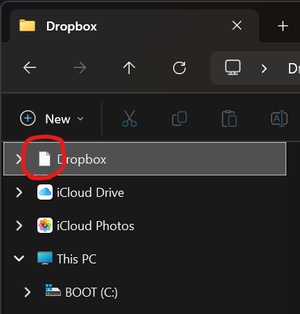
Application Affected Dropbox (Microsoft Store version) Device Windows 11 Custom Build PC Operating System/Browser (if using the web) Windows 11 Pro 24H2 and now 25H2 Dropbox App Version (if using the app) 234.4.5591 Question or Issue On my new PC I have installed Dropbox via the Microsoft Store. It is all working, except the Dropbox icon itself is wrong in Explorer for my Dropbox folder. It is just showing a plain white piece of paper. Again this is a brand new system with a brand new install of Windows 11 Pro that I did myself - nothing weird, I didn't use any of the means to "debloat" - it is just a default Microsoft Windows 11 24H2 install. I had the problems on 24H2 and it upgraded to 25H2 the other day and that has not changed the issue. It is more of an annoyance than anything because my eyes are used to looking for the dropbox icon appearance to find it and the plain white paper doesn't stand out so much.Solved338Views0likes13Comments