Your workflow is unique 👨💻 - tell us how you use Dropbox here.
desktop
2070 Topics
Windows Explorer hangs for 30 seconds
Application Affected (Dropbox Basic) Device Asus Z170-PRO custom build w/ Intel i7-6700K Operating System/Browser (if using the web) Windows 10 Dropbox App Version (if using the app) (242.4.5815) Question or Issue I open Windows Explorer and navigate to the Dropbox folder. When I double-click on a folder in the right panel of Explorer it hangs for 30 seconds. Then the contents are displayed. If I open the folder by using the left navigation bar Explorer does not hang. When I Quit the Dropbox app from the task bar, the hang still occurs. The Dropbox folder is the only one where this hang occurs. Note: I have two Windows user accounts with two separate Dropbox accounts.Solved34Views0likes3Comments
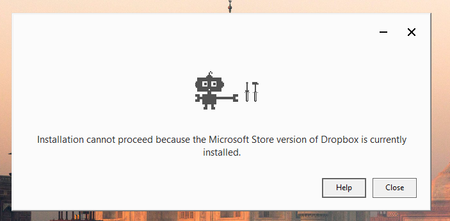
Can't log in to the desktop app on Windows11 with an "access is denied" error
Application Affected Dropbox Device Lenovo laptop Operating System/Browser (if using the web) Windows 11 Dropbox App Version (if using the app) Dropbox 242.4.5815 Offline Installer.x64.exe Question or Issue i couldn't login into dropb and i got the follwing error: bn.BUILD_KEY: Dropbox bn.VERSION: 241.4.4853 bn.constants.WINDOWS_SHELL_EXT_VERSION: 89 bn.is_frozen: True machine_id: cdafbbac-4a5d-44c0-9bea-a72c1c8c8234 pid: 6080 cwd: 'C:\\WINDOWS\\system32' real_path='C:\\Windows\\System32' mode=0o40777 uid=0 gid=0 parent mode=0o40777 uid=0 gid=0 HOME: None appdata: 'C:\\Users\\amir.dar\\AppData\\Local\\Dropbox\\instance6' real_path='C:\\Users\\amir.dar\\AppData\\Local\\Packages\\DropboxInc.Dropbox_xbfy0k16fey96\\LocalCache\\Local\\Dropbox\\instance6' mode=0o40777 uid=0 gid=0 parent mode=0o40777 uid=0 gid=0 dropbox_path: None not found parent not found sys_executable: 'C:\\Program Files\\WindowsApps\\DropboxInc.Dropbox_241.4.4853.0_x64__xbfy0k16fey96\\Dropbox.exe' real_path='C:\\Program Files\\WindowsApps\\DropboxInc.Dropbox_241.4.4853.0_x64__xbfy0k16fey96\\Dropbox.exe' mode=0o100777 uid=0 gid=0 parent mode=0o40777 uid=0 gid=0 trace.__file__: 'C:\\Program Files\\WindowsApps\\DropboxInc.Dropbox_241.4.4853.0_x64__xbfy0k16fey96\\241.4.4853\\python-packages.zip\\dropbox\\client\\ui\\common\\boot_error.pyc' real_path='C:\\Program Files\\WindowsApps\\DropboxInc.Dropbox_241.4.4853.0_x64__xbfy0k16fey96\\241.4.4853\\python-packages.zip\\dropbox\\client\\ui\\common\\boot_error.pyc' not found parent not found TMP: C:\Users\amir.dar\AppData\Local\Temp TEMP: C:\Users\amir.dar\AppData\Local\Temp tempdir: 'C:\\Users\\amir.dar\\AppData\\Local\\Temp' real_path='C:\\Users\\amir.dar\\AppData\\Local\\Temp' mode=0o40777 uid=0 gid=0 parent mode=0o40777 uid=0 gid=0 Traceback (most recent call last): File "desktop/dropbox/client/main.py", line 6945, in _setup_root_for_account File "desktop/dropbox/sync_root/helpers.py", line 199, in create_root_for_account File "desktop/dropbox/foundation/futures/basic.py", line 1040, in result File "desktop/dropbox/sync_root/manager.py", line 382, in create_root File "desktop/dropbox/sync_root/handlers/windows/cloud_files.py", line 299, in register File "desktop/dropbox/sync_root/handlers/windows/cloud_files.py", line 601, in _register PermissionError: [WinError -2147024891] Access is denied So, i've uninstalled the app and deleted the registery key (used chatgpt for those steps) now, i can't reintall the app38Views0likes2Comments
Can't start the Dropbox app on my new Windows device. Nothing happens.
Application Affected Dropbox Device HP generic, new, laptop Operating System/Browser (if using the web) Windows 11 Dropbox App Version (if using the app) Can't really tell since it won't start Question or Issue Have been using Dropbox for years. Recently had to get a new laptop because of work issues. I downloaded the app from dropbox.com. It installs just fine. When I start it and press the login button, it very briefly starts a hidden terminal session. The terminal closes almost instantly without displaying its window (therefore I can't see what it tries to do) and then nothing more happens. It will not even display the login window (username/password). Tried reboots and starting the application with administrator privilegies. Doesn't work. No error messages. Works just fine on my other computers, but this is the one I travel with which is a problem. One thought is that the installer tries to access the Edge browser or its dependencies, which I don't have installed (optional in the EU). Please help!64Views0likes9Comments
Dropbox (opening folder) causing OS X Finder to beachball
Application Affected (Dropbox and OS X Finder) Device OS X Sonoma Operating System/Browser (if using the web) (Windows 11, macOS14.3, etc.) Dropbox App Version (if using the app) 242.4.5815 Question or Issue On OS X Sonoma - when I click on the Dropbox folder in finder it beachballs - from ~15 - 30 seconds, sometimes a couple of times. I can't then access any other folders in finder i.e. it locks up all of finder. Tried a bunch of approaches clearign caches etc- does anyone have a potential verified fix for this issue?14Views0likes0Comments
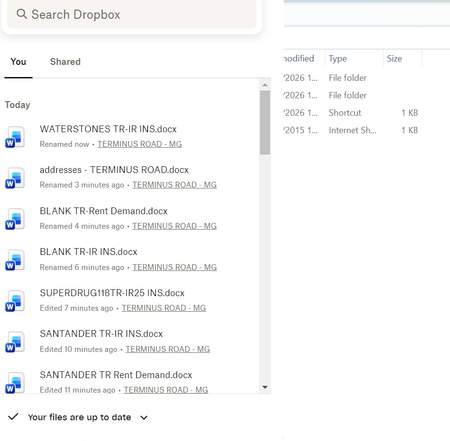
Every time I open my Dropbox folder the tray window pops open
Question or Issue I am using an HP laptop running windows 11 with the Dropbox app downloaded Recently, every time I open Dropbox, a box with my history pops up - SEE BELOW This is REALLY annoying, as I can't access my folders list which is hidden behind it. I have to keep tapping things until it disappears! How do I stop it appearing please?42Views0likes2Comments
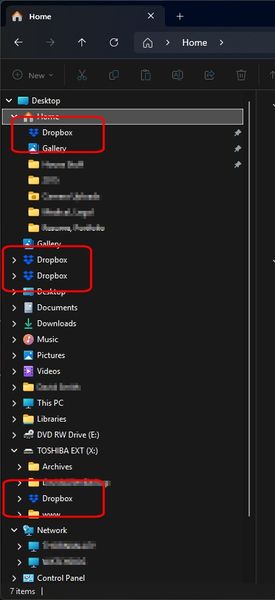
How do I get rid of Dropbox showing in multiple places in Windows Explorer?
Device Dell Alienware 17 Operating System/Browser (if using the web) Windows 11 Pro Dropbox App Version (if using the app) 241.4.4853 Dropbox Plan Plus Question or Issue How do I get rid of Dropbox showing in multiple places in Windows Explorer? See screenshots. Dropbox functions fine it just appears in multiple places for some reason. This has actually been going on for a year or so but now there's four of them. How many am I really supposed to have? They all go to the same place but ...yea, this isn't right - is it? This feels like an obvious problem that should be addressed (like the various sync problems) but it doesn't seem like there have been many updates at all to the desktop app in quite some time.49Views0likes4CommentsMy desktop app on macOS Tahoe won't start/open.
Device (MacBook Air, M3, 2024) Operating System/Browser (if using the web) (macOS Tahoe v.26.3) Dropbox App Version (if using the app) (unclear - can not get the app to truly open, despite the error I get when trying to uninstall saying it is open/ running) Syncing Status (VERY out of sync, mysteriously) Question or Issue: My desktop sync app seems to be operating in a limbo state between being open, and not being open. It is not working, indicated by the severely out of sync state of the folders (half missing), but uninstall fails, because the app shows as "open" despite being unopenable. I've tried opening the application, but what I see upon double-clicking the application is the blink as if it is opening, then I get brought to the out of sync finder folder window, and yet there is no icon in the menu bar as it should be, and I can not access the app settings, indicated that it isn't truly open, but the error below indicates otherwise. I referenced this user's recent issue that seemed similar to mine, and tried to follow the advanced reinstallation instructions, after trying a simple reinstall to no avail, but got the following error when I attempted to move the app to trash: "The item 'Dropbox' can’t be moved to the Trash because it’s open." The sync function was working normally as late as last night, and I updated the system's operating system as prompted yesterday morning. I can only assume there is an issue related to the OS update, but the delay does seem odd.Solved142Views0likes12Comments
Dropbox app on Windows 11 intermittently hangs.
Application Affected Dropbox folder and tray application Device Dell Alienware Aurora R2 Operating System/Browser (if using the web) Windows 11 24H2 and now 25H2 v235.4.5905 Question or Issue The Dropbox application has been intermittently hanging on my computer for at least 4 months. I use the app to take photos with my iPhone and regularly notice that Photos from my iPhone are not appearing in my "Camera Uploads" folder on my PC. If I create a file in the Dropbox folder, it shows the two blue arrows but makes no progress. If I right If I right-click on the Dropbox tray icon, nothing happens. If I start task manager and kill all the running Dropbox processes, then use Start -> Dropbox, everything is normal again for a while. Typically, I find it hung about once a day, although it's not after anything in particular that I remember doing -- usually when I go to look for a photo I took, I find it's not there, and the tray icon is non-responsive. I'm only using 1.35% of 2.01TB so space is not a problem. My C drive, which contains the Dropbox folder in my home directory has 273GB free out of 951GB. I believe I am running the latest version of Dropbox. There's another thread From September with a similar report and supposedly an update fixed it. I do also have OneDrive, iCloud Drive, iCloud Photos, running on my computer and the Adobe Cloud as well, although I think they handle sync differently. Any ideas as to how I might resolve this problem?209Views1like7Comments
Linux install - do not add "dropbox.list" to apt... (deb)
Linux install - do not add "dropbox.list" to apt... (deb install) latest Linux versions use DEB822 Source Format now (.sources) or replace "dropbox.list" with "dropbox.surces" example: Types: deb URIs: http://linux.dropbox.com/ubuntu/ Suites: questing Components: main Signed-By: /etc/apt/trusted.gpg.d/dropbox.ascSolved298Views1like10Comments
The app seems to be crashing on macOS Tahoe 26.4 (Beta 1)
Application Affected Dropbox Device mac studio Operating System/Browser (if using the web) macOS 26.4 Beta 1 Dropbox App Version (if using the app) 241.4.4853 Question or Issue Dropbox is crashing since I installed macOS Tahoe 26.4 (Beta 1) this morning. The errormessage is: DYLD_LIBRARY_PATH: None cwd: '/' real_path='/' mode=0o40755 uid=0 gid=0 parent mode=0o40755 uid=0 gid=0 HOME: '/Users/sander' appdata: '/Users/sander/.dropbox/instance3' real_path='/Users/sander/.dropbox/instance3' mode=0o40700 uid=501 gid=20 parent mode=0o40755 uid=501 gid=20 dropbox_path: '/Volumes/Data/.CloudStorage/Data/Dropbox' real_path='/Volumes/Data/.CloudStorage/Data/Dropbox' mode=0o40700 uid=501 gid=20 parent mode=0o40755 uid=501 gid=20 sys_executable: '/Applications/Dropbox.app/Contents/MacOS/Dropbox' real_path='/Applications/Dropbox.app/Contents/MacOS/Dropbox' mode=0o100755 uid=501 gid=20 parent mode=0o40755 uid=501 gid=20 trace.__file__: '/Applications/Dropbox.app/Contents/Resources/python-packages.zip/dropbox/client/ui/common/boot_error.pyc' real_path='/Applications/Dropbox.app/Contents/Resources/python-packages.zip/dropbox/client/ui/common/boot_error.pyc' not found parent not found tempdir: '/var/folders/v5/1fn_t3055sd904vr0bg75ts40000gn/T' real_path='/private/var/folders/v5/1fn_t3055sd904vr0bg75ts40000gn/T' mode=0o40700 uid=501 gid=20 parent mode=0o40755 uid=501 gid=20 Traceback (most recent call last): File "desktop/dropbox/fs_api/lifecycle.py", line 238, in client File "desktop/dropbox/fs_api/lifecycle.py", line 297, in _create_thin_client File "desktop/dropbox/fs_api/fs_api_adapter.py", line 54, in __init__ File "desktop/extensions/fs_api/fs_api_python.pyx", line 63, in fs_api_python.FsApiServer.__cinit__ fs_api_python.FsApiError: "Initializing fs api |>> Initializing platform |>> Opening worker root directory |>> open syscall |>> FSErrorCode::PermissionDenied" The above exception was the direct cause of the following exception: Traceback (most recent call last): File "desktop/dropbox/client/main.py", line 1106, in wrapper File "desktop/dropbox/client/main.py", line 8849, in finish_dropbox_boot File "desktop/dropbox/client/message_queue.py", line 338, in _wrapped File "desktop/dropbox/client/main.py", line 8130, in _init_components_for_account File "desktop/dropbox/client/main.py", line 8038, in create_sync_engine File "desktop/dropbox/sync_engine_boundary/factory.py", line 237, in make_sync_engine File "desktop/dropbox/sync_engine/nucleus/classic_client/sync_engine.py", line 264, in __init__ File "desktop/dropbox/sync_engine/nucleus/classic_client/modern_client/modern_client.py", line 330, in __init__ File "desktop/dropbox/sync_engine/nucleus/classic_client/modern_client/base.py", line 260, in __init__ File "../mac_arm64_dropbox_virtual_env/lib/python3.8/functools.py", line 967, in __get__ File "desktop/dropbox/fs_api/lifecycle.py", line 267, in client dropbox.fs_api.lifecycle.FsApiClientCreationException: "Initializing fs api |>> Initializing platform |>> Opening worker root directory |>> open syscall |>> FSErrorCode::PermissionDenied"211Views0likes8Comments