We're making some changes to the Dropbox Community 👩💻 - Find out more here.
iOS
68 Topics
How to reset my camera uploads on iOS? Dropbox will only re-add newer photos.
Hi! I need to force the iOS app to re-upload all the photos in my Camera Roll/iCloud Photos. I set it up so it uploads everything, not just new photos, but it will only upload new items. I believe it recognizes older pics as "already uploaded" and I don't know how to reset this. I have already re-installed the app, deleted all files in the Dropbox's Camera upload folder, restarted the device. Still, Dropbox will only upload new files. Thanks in advance!102Views0likes6Comments
Is viewing with download disabled for free accounts?
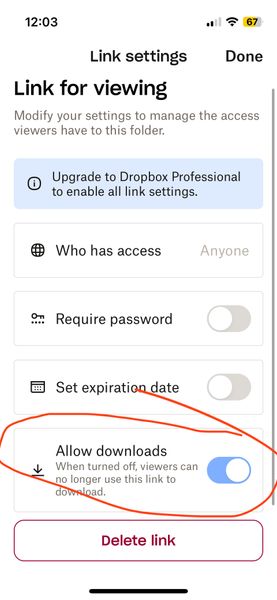
Is viewing with download disabled for free accounts? (I am on a free account) When I go to share (and subsequently generate a link) I now see a mandatory choice of either 1) editable or 2) viewable only. The software defaults to editable (which I think I was inadvertently using for a while and NOT what I want). When I noticed this today, I went to the viewable option instead and then looked at the settings. There are options (see screenshot below) but it seems like the option to have downloads enabled on viewable links is greyed out? But also kind of difficult to tell – it looks lighter blue than normal GUI switches I've seen in the past... It looks like it is on by default but I don't know if it being greyed out means that it is stuck on or that it is not functional (meaning even though its showing as on, the greyed-out-ness means it is actually off AKA no downloads for recipient). Can you please clarify this confusing interface before I send the link? I do not want to send things then recipients say they can't access it. The interface really shouldn't be this confusing. Thanks!Solved52Views0likes2Comments
Dropbox iOS app shows my Camera Uploads photos with my Family Room content
This is very strange, I an the organizer of a family plan, and when I select the photos section appears the family room pics by default. Then I activate the camera upload in my iPhone to see the Camera uploads folder, so after finishing with some folders, go to Photos in the Dropbox app and shows the Family Room pics and my personal photos. I don’t know how desactive the Family Room pictures showing mixed with personal photos. Additionally, the camera uploads not create the folders like as Smart Albums are in the iPhone. Device iPhone Air 17 iOS 26.385Views0likes4Comments
After the latest iOS mobile app update, my offline files have been re-syncing.
I upgraded to version 428.2 yesterday and now my Dropbox app always shows my offline files as queued for resync when I launch the app. I just tested it by syncing my files, then closing and relaunching the app and every entry in my offline list has that little blue circle with the white arrows. The files are still available so I guess it's not really re-downloading them? I'm hoping this is just a UI glitch.1KViews0likes22Comments
Uploading selection of photos from Camera Roll to Camera Uploads folder via the iPhone?
How do I re-upload just one year of photos from iPhone to Dropbox with Camera Uploads? I tried selecting and sending but the file name is wrong - I want it to have the year-month-date the way it does with Camera Uploads. Then I put them in an album and tried "selecting where you’d like to upload from” but nothing. Paused Sync and restarted but still nothing. Under “Back up…” my only options are All Photos or one date. Seems like I should have more options like start and end date, or album(s).133Views0likes5Comments
Raw iOS files are uploading to Dropbox as .jpg via camera uploads.
Hi - I just saw a post in which April from Dropbox said that Apple Camera Raw transfers on camera upload (I’ve noticed mine don’t) and then did simple test because I don’t use iCloud instead preferring to use dropbox. And voila. Jpg uploaded. Only. No dng. Why is Dropbox so confident that it uploads raw when it clearly doesn’t upload Apple raw despite the setting in camera uploads saying it will? I’ve been uploading now for years thinking it did when iCloud would have. Sigh. What a misclaim!341Views0likes2CommentsCan no longer add files to or export from Dropbox on my Kindle Fire
Device: Kindle Fire Max 11 Operating system on computer (Mac Mini): Mac OS 26.2 I was always able to download pdfs into SongBook Pro, moving them from my Mac to Dropbox, then using my Dropbox on the Kindle I would export them to SongBook Pro. It would show up on the mac's Dropbox but not the Kindle's Dropbox, plus I could not delete files on my Kindle's Dropbox. So I uninstalled the Dropbox on the Kindle, reinstalled it but now cannot sign into Dropbox. Instead I get a message, "Can't connect to Dropbox. Make sure you're online, or try again later". Tried it again with ""HAVING TROUBLE SIGNING IN", I get the same message. Yet everything else still works on my Kindle, easily accessing the internet (as you can see, I'm contacting you). The Kindle is new, (one month old). The older one was the same kind (Fire Max 11). DROPBOX TRANSFER157Views0likes2Comments