Your workflow is unique 👨💻 - tell us how you use Dropbox here.
Forum Discussion

Dimples
3 years agoHelpful | Level 5
Couln't download. Remove incompatible characters from the filename
Recently all of my computer with Dropbox have started showing a sync error "Couln't download. Remove incompatible characters from the filename. e.g. emojis, /\"<>:|?*"
The problem filename isn'...
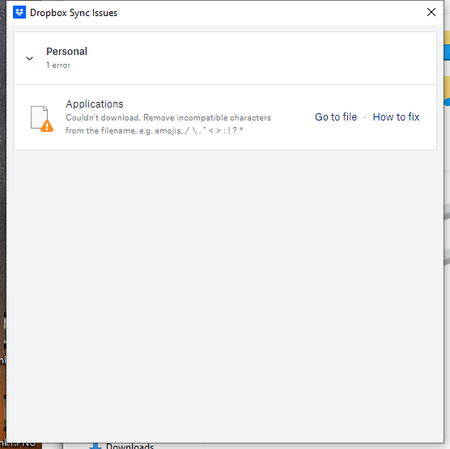
- 2 years ago
Hey Roy2010, no worries let me share Sam's response here as well.
Hi everyone,
Sharing an update on the topic: our team is working on adjusting this, and it's expected to roll out in our next Stable Build (V190).
You can check our releases here, and we'll keep you informed on the progress.
Thanks,
Sam
I appreciate your patience on this, thank you!


Gabrielle Neal
4 years agoHelpful | Level 6
Thanks Megan,
I have done as suggested.
My question is HOW did this happen to files that have previously synced fine.
These are HISTORIC files, not something loaded in the last week, and they were fine when they loaded.
I actually don't know how they were ever created on any computer with invalid characters.
Majority of them had a : in the file name.
I have worked with computer a long time and this character has never been allowed by PC or Mac.
The only thing done differently this last fortnight is I upgraded to Windows 11 and then changed my mind when things stopped working. I have since gone back to Windows 10.
Next idea please.

chikega
4 years agoHelpful | Level 5
Same here, some of these files go back 10+ years and all of a sudden it's an issue? I know Dropbox hires some of the most talented programmers on the planet. The interface that is presented to us is clumsy to even begin attempting to change hundreds of files. "Go to file" for each and every file is extremely unrealistic. It actually opens each file in a new browser window ... yes we're inside the file. We don't need to be inside the file in order to rename the file. Who designed that interface should spend a week using his/her creation and see how painful it is to use. DropBox should present an interface of all offending files like in an explorer/finder window that would allow us to multi-select and run a REGEX-based script to remove the offending characters. /\."<>:|?* C'mon DropBox, you can do better than this!
 Mike B.533 years agoHelpful | Level 5
OMG, yes, this!
Dumb interface for figuring out what's wrong with hundreds of my files that synced just fine (some for years) but suddenly today are a problem fror DropBox. And, the few "problem" files that I looked at have nothing but the letters a-z and a few spaces.
- Mark3 years ago
Super User II
is the space at the end of the name of the file (e.g. "Mark .pdf" rather than "Mark.pdf")? If so that is an often incompatible with other OSs
- Mike B.533 years agoHelpful | Level 5
Hi Mark,
Thank you for trying to help me!
No, of today's 138 errors, any that I see do not have a space before the .pdf (or jpeg, indd, png, tiff, etc). In fact, many files have no spaces at all such as "CGI.jpg". A couple of screen caps attached. And these files are both old and weren't previously a problem. Thanks, Mike

About View, Download, and Export

Get support with viewing, downloading, and exporting files and folders from your Dropbox account.
The Dropbox Community team is active from Monday to Friday. We try to respond to you as soon as we can, usually within 2 hours.
If you need more help you can view your support options (expected response time for an email or ticket is 24 hours), or contact us on X, Facebook or Instagram.
For more info on available support options for your Dropbox plan, see this article.
If you found the answer to your question in this Community thread, please 'like' the post to say thanks and to let us know it was useful!


