Your workflow is unique 👨💻 - tell us how you use Dropbox here.
Forum Discussion

Dimples
3 years agoHelpful | Level 5
Couln't download. Remove incompatible characters from the filename
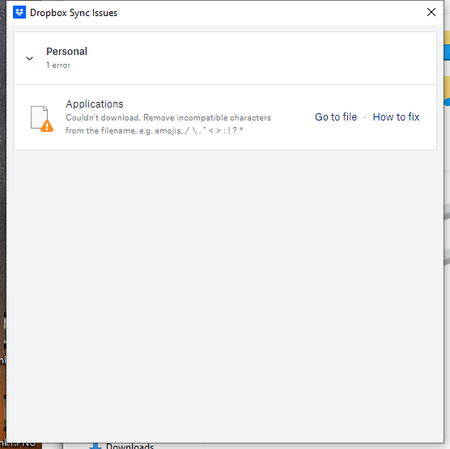
Recently all of my computer with Dropbox have started showing a sync error "Couln't download. Remove incompatible characters from the filename. e.g. emojis, /\"<>:|?*"
The problem filename isn'...
- 2 years ago
Hey Roy2010, no worries let me share Sam's response here as well.
Hi everyone,
Sharing an update on the topic: our team is working on adjusting this, and it's expected to roll out in our next Stable Build (V190).
You can check our releases here, and we'll keep you informed on the progress.
Thanks,
Sam
I appreciate your patience on this, thank you!


Hannah Dropbox Community Moderator
3 years agoDropbox Community ModeratorHey Dimples, sorry to jump in.
I think Megan is referring to the file in question, the one in the sync issues. Are you able to locate that on our website, to check for the spaces she mentioned?

Dimples
3 years agoHelpful | Level 5
Hannah, Thanks for jumping in. IF I knew the filename, I could search for it, but Dropbox never tells me the file name, so what exactly do I search for?
 jbales3 years agoExplorer | Level 4
Similar issue. I can't upload files because of incompatible characters in the file names, but there are no incompatible characters. See screen shot.
Version 148.4.4519 (148.4.4519)
- Megan3 years ago
Hi Dimples, when you sent us the screenshot, it showed the file name "Applications" there. Can you please try this precise file name?
Thanks for the screenshot jbales! Are these files added in your Dropbox folder, or online? Have you tried the troubleshooting steps shown through this thread?
- Dimples3 years agoHelpful | Level 5
Megan I believe I've found the problem. When I open a Word document in my dropbox folder, it creates a TMP file with a ~ in the name. IF dropbox tries to sync while that file is open, would it cause this error. Then if I close that file the TMP file disappears and thus DB cannot show it to me. Going to test today to see if I can duplicate the error.
- jbales3 years agoExplorer | Level 4
I just checked and the files were uploaded in spite of the error message. Which is good! But I don't want to get stray error messages and have to check if things really did upload
 nomadism3 years agoExplorer | Level 4
So, I'm back with the same problem. Initially, as you can see in my previous reply to this thread (as well as other posts here), the error message was due to some apps making temporary files that included the so-called incompatible characters. However, in this case, there are none such characters.
As you can see, the dropbox app spits out the same error message, but the file itself is fine (as you can see in the file in the finder), and the file is also uploaded an available in dropbox.com (see the browser).
So in the end, what I see here is that
1) the dropbox app is spitting out error messages when there is actually no error at all.
2) It doesn't seem to be related to a specific app (the files belong to a storage folder of juris-M [a bibliographical software] or obsidian vault file)
3) One common thing among the error files are that they are all written in Korea. But even then, other Korean files don't seem to have a problem.
4) I can't remember when, but it seems to have been tied to some update along the way. Maybe a dropbox update, maybe a MacOS update.
Dropbox v149.4.4568
MacOS Monterey v 12.4
Glad to offer more help.
 AlexSzatmary2 years agoExplorer | Level 4
I'm having this same problem. I'm changing from an Intel Mac running macOS 12.6.3 to an Arm Mac running macOS 13.5. Dropbox synced the files to the new machine. I then pushed a button to change the storage location from home to CloudStorage, so the File Provider API is now being used. I had not noticed these sync issues earlier and the old Mac is not reporting any of these sync issues. I wonder if the issue is tied to the File Provider API.
Some sample "incompatible" filenames include,
- .mainrel.f.swp
- Schedule 2017-fall.graffle.sb-75449bd4-4pTIjt
- ratchet.py~
None of those should be "incompatible;" it's fine to end a filename with a ~ or have multiple .'s in a filename.
- Walter2 years ago
Hey AlexSzatmary, sorry to hear about this.
I just wanted to mention that periods should not be used in file names as they could result in errors or they won't be synced at all. For more information, you can have a look here.
I hope this helps a tad.
- AlexSzatmary2 years agoExplorer | Level 4
Hi Walter, I mean that those are ordinarily legal filenames. I recognize that Dropbox does not currently handle them but I think it should. I routinely use filenames like confection2-decay_F-vary_gamma_E-r_L0.1phi_E1.00gamma_E1.00e-01.pdf and that particular file even does sync properly on Dropbox.
- Walter2 years ago
Thanks for your feedback on this AlexSzatmary - let me know if you have anything else to add.
 Arkadiy K.2 years agoHelpful | Level 7
I am a developer, and one of the programs that I use requires me to have filenames like ".pve-ignore.ifcfg-eth0" (the program required me to add a ".pve-ignore." prefix to the files that should be ignored by the program).
Dropbox normally uploads and downloads these files from my computer, however, they are still showing up in "Sync issues".
What is the problem here?
- Walter2 years ago
Hey Arkadiy K., thanks for joining the discussion here.
Those dots in the filenames must be the culprit here. You can have a look at this Help Center article for more information about naming your files in Dropbox.
Hope this helps!
- nomadism2 years agoExplorer | Level 4
I've basically given up on this issue as if feels like dropbox support doesn't seem to really understand the issue here. I - among others who have raised this issue - are fully aware of what dropbox recommends to put and not put in file names. I really wish dropbox could stop leading us to that same help article.
What I want to know why dropbox says there are "sync errors" when there are not. Maybe initially there is an issue - hence the sync error message - but in the end, dropbox DOES upload those **bleep** files. So why is dropbox sending "false" sync errors messages, when eventually there isn't such an issue?
- Arkadiy K.2 years agoHelpful | Level 7Hi !
I believe that the error message should be adjusted. Instead of “could not download” (which is incorrect, as the file did download to my computer), there should be a warning instead - “this file might not correctly sync to other devices, but is still stored in your Dropbox account” - nomadism2 years agoExplorer | Level 4
Um, no. Your comment, Mark, indicates that this issue is not fully understood by many people here.
The screen shot that we - people who are raising these issues - are very specific "sync errors" even though they are simply labelled as a broad "sync error." The error message says that dropbox could not download (or in my case, upload) the file(s), but in the end the files are uploaded / downloaded without errors.
So the sync error isn't simply saying that there might be a problem, as your comments suggests. The error message specifies what the problem is, but in the end the stated "problem" doesn't occur and actually self-corrects.
That's why I had given up even raising - Dropbox repeats the same answer without addressing what the real issue is.
- Fox22 years agoExplorer | Level 4
I agree - Dropbox support is not resolving the key issue here.
Walter asks for status and version, mine says 'Your files are up to date', and I am on v189.4.8395 on MacOS Monterey 12.7.2 (old-ish Mac Mini). I have the same problem on my Mac Air which is on Sonoma 14.1.2
1. The dialogue box that lists all the files has what appears to be a link 'View file' but the link does not work, it simply goes to the root file (as stated in previous posts) and does not go to the offending file at all. This needs to be fixed first so we can actually go to the problem file.
2. Part of the trouble-shooting advice in this thread is to go to your account on the web and search for incompatible characters. However, there does not appear to be any way to show or search for 'incompatible characters'. I have tried searching for (say) '?' but nothing is found in file names. Is there a menu option somewhere?
3 Worst, the dialogue box is not wide enough to show the full file name, so we have no chance of using Finder to locate the offender. An example of an error on my sync issues pop-up box is UsrClass.dat(4e7cc44b-d335-....... gtrans.ms where the dots perhaps represent characters omitted from the error message? By shortening the file name this way DropBox have compromised my ability to do any trouble shooting whatsoever.
4 Its more than just open files, the error is triggered for files that are closed; having said that they are complex file names so I can see they don't fit the 'mask' but the point is we need tools to find them.
5 More than anything, we (users) often don't have a choice about file naming, it may be controlled by the software author so just being able to find them and 'fudge' the file name to something that is accepted doesn't really solve the problem either as we (payers of the annual license) actually want it synchronised in its original state.
6 It's hard to prove whether a particular file synchronised or not (as per comment by nomadism) - its a 'Catch-22' problem if you can't find them...
I think this thread will run for a while...
But thank you for reading anyway.
- Galfodo2 years agoExplorer | Level 4
I came here because I have suddenly started to have the same issue. With files I have had in my dropbox for years and years. Suddenly it is not supposed to be legal to have dots ('.') in your filenames? This is perfectly legal on all OS's that I'm aware of, and lots of software create files with such names. I noticed that all the files the app complains about were created on/for a mac, and it looks to me like this may be the case for others as well.
This is some kind of regression and whether it be some blunder by the Dropbox developers or in a recent macOS update, it has to be fixed. Renaming files won't cut it.
 Simone Attivissimo2 years agoExplorer | Level 4
Well said!
I'm having the same problem, with 4 .rtfd files. I've got about 100 other .rtfd files on Dropbox that are not causing the same problem.


About View, Download, and Export

Get support with viewing, downloading, and exporting files and folders from your Dropbox account.
The Dropbox Community team is active from Monday to Friday. We try to respond to you as soon as we can, usually within 2 hours.
If you need more help you can view your support options (expected response time for an email or ticket is 24 hours), or contact us on X, Facebook or Instagram.
For more info on available support options for your Dropbox plan, see this article.
If you found the answer to your question in this Community thread, please 'like' the post to say thanks and to let us know it was useful!


