Your workflow is unique 👨💻 - tell us how you use Dropbox here.
Forum Discussion

Dimples
3 years agoHelpful | Level 5
Couln't download. Remove incompatible characters from the filename
Recently all of my computer with Dropbox have started showing a sync error "Couln't download. Remove incompatible characters from the filename. e.g. emojis, /\"<>:|?*"
The problem filename isn'...
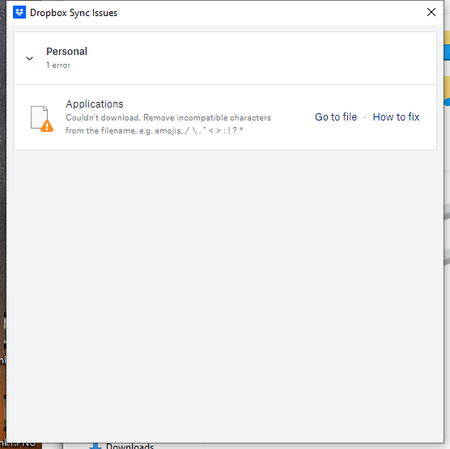
- 2 years ago
Hey Roy2010, no worries let me share Sam's response here as well.
Hi everyone,
Sharing an update on the topic: our team is working on adjusting this, and it's expected to roll out in our next Stable Build (V190).
You can check our releases here, and we'll keep you informed on the progress.
Thanks,
Sam
I appreciate your patience on this, thank you!

Dimples
3 years agoHelpful | Level 5
Meghan, I don't have an "applications" folder. Not sure what to search for.

Megan Dropbox Community Moderator
3 years agoDropbox Community ModeratorCan you try uninstalling the app, and then re-installing to see if the results in regards to the syncing status remain the same, Dimples?
- Dimples3 years agoHelpful | Level 5
Megan I believe I've found the problem. When I open a Word document in my dropbox folder, it creates a TMP file with a ~ in the name. IF dropbox tries to sync while that file is open, would it cause this error. Then if I close that file the TMP file disappears and thus DB cannot show it to me. Going to test today to see if I can duplicate the error.
About View, Download, and Export

Get support with viewing, downloading, and exporting files and folders from your Dropbox account.
The Dropbox Community team is active from Monday to Friday. We try to respond to you as soon as we can, usually within 2 hours.
If you need more help you can view your support options (expected response time for an email or ticket is 24 hours), or contact us on X, Facebook or Instagram.
For more info on available support options for your Dropbox plan, see this article.
If you found the answer to your question in this Community thread, please 'like' the post to say thanks and to let us know it was useful!


