Your workflow is unique 👨💻 - tell us how you use Dropbox here.
Forum Discussion

Dimples
3 years agoHelpful | Level 5
Couln't download. Remove incompatible characters from the filename
Recently all of my computer with Dropbox have started showing a sync error "Couln't download. Remove incompatible characters from the filename. e.g. emojis, /\"<>:|?*"
The problem filename isn'...
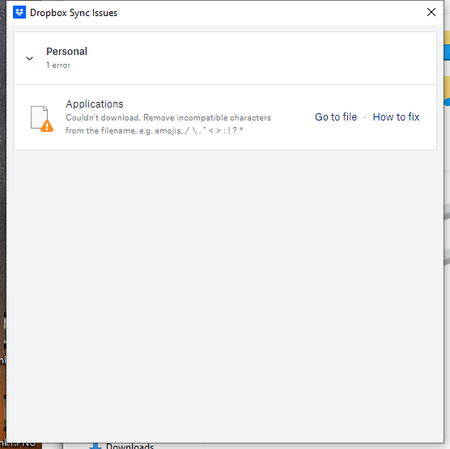
- 2 years ago
Hey Roy2010, no worries let me share Sam's response here as well.
Hi everyone,
Sharing an update on the topic: our team is working on adjusting this, and it's expected to roll out in our next Stable Build (V190).
You can check our releases here, and we'll keep you informed on the progress.
Thanks,
Sam
I appreciate your patience on this, thank you!

hzee
2 years agoHelpful | Level 6
If I remove the ~ character, the sync works just fine.
The ~ character blocks the sync and triggers daily errors in my macOS menubar.
This happens in both cases: the file is created on my MacBook and the file is created in the web app.
Yes, I hope that you can take that as feedback for the beta developers.
There's nothing special about the ~ character. It causes no problems with any OS or system. So it should not cause errors.

Megan Dropbox Community Moderator
2 years agoDropbox Community ModeratorHi hzee, definitely keeping a note of this!
Your comments on syncing and how it works in this particular case have been quite helpful, and I will do everything I can to ensure that your voice is heard.
I'll forward your feedback to the appropriate areas so we can continue to improve. Thanks!
 NanoExplorer2 years agoHelpful | Level 6
I have about 200 files with tildes in them, and like @hzee they haven't caused any problems until today. I'm on 189.4.8395, also on Mac arm 13.6.2. Among these new errors are a couple other files that start with a dot and end in '.swp' like '.test.swp'.
Also, I noticed that dot is listed among the special characters that are not allowed in file names. I hope that doesn't mean all my files with multiple dots will cause problems in the future.
- Megan2 years ago
Allow me then to share the response here as well:
A change was made recently which surfaces these issues in Dropbox's Sync issues UI, but this specific issue previously existed before that recent change.
When Dropbox on macOS uses File Provider, macOS specifies certain filenames types that they will ignore, including filenames ending in a '~'. This ignore list is built-into macOS. Because of this, Dropbox can't sync files that match one of these ignored filename patterns.
If you have a file that matches this ignore list in your Dropbox on our servers (maybe you uploaded it from a different device for instance), we cannot download that file onto a device running macOS. It is still safe on Dropbox's servers. You can either ignore the warning or you can remove the file from your Dropbox through the website if you don't want to sync it to any of your devices.
 utpmg2 years agoHelpful | Level 7
But these files were originally stored using a Mac. I've never used a PC. I understand that something has changed, but users should be notified that a change has been made, not surprised with dozens of "errors" suddenly.
 David A.512 years agoNew member | Level 2
Same issue here. The tilde is used in many systems to create backup files, especially, in my case, when I use Latex. I guess I can remove them all, or ignore the sync errors, but this wasn't a problem and now it is. Please do feed back to the developers.
- Samaelsquirrel2 years agoHelpful | Level 5
Also got 50 sync issues since this morning : invalid characters in filename, what has changed (files are in my db for over 5 years now !!!) ?!?
This remind me of when mac os icons disappeared after a dropbox update...
version : 189.4.8395
- JDutton942 years agoExplorer | Level 4
We have had the same issue, cropped up a few weeks ago. Suddenly a load of folders appeared with : in them which have been fine for years and years, and its causing constant sync issues. Reading through this post in detail, it seems we are not the only one with this problem, and Dropbox are doing nothing about it. This is affecting 300+ folders, going through and renaming them one by one isn't an acceptable solution, clearly there is a bug somewhere that needs addressing.
 DavidLG2 years agoNew member | Level 2
Just to add on, I was a friend of Drew Houston's in college and one of the first 100 users of Dropbox, and I've been using it the entire time (15 years or so). I've never had a significant issue and never needed customer support (even with the Dropbox folder moving locations due to macOS limitations, sometime in the last few years, and online-only files being a little janky).
I have at least 500 sync errors now (I'm not sure if it caps the list at 500), in version 189.4.8395, due to file names ending with tilde. This is crazy to me. I don't use Emacs anymore, so I probably could write a command-line command that removes all those files. But long-time users will eventually move away from Dropbox if it can't sync files with tilde in the name. That's not reasonable.
- Megan2 years ago
Hey guys,
You can see more about this in this related thread. If you have any questions, let us know.
I hope this helps!
- Samaelsquirrel2 years agoHelpful | Level 5
... nice fail.
Access DeniedYou do not have sufficient privileges for this resource or its parent to perform this action.Click your browser's Back button to continue.
About View, Download, and Export

Get support with viewing, downloading, and exporting files and folders from your Dropbox account.
The Dropbox Community team is active from Monday to Friday. We try to respond to you as soon as we can, usually within 2 hours.
If you need more help you can view your support options (expected response time for an email or ticket is 24 hours), or contact us on X, Facebook or Instagram.
For more info on available support options for your Dropbox plan, see this article.
If you found the answer to your question in this Community thread, please 'like' the post to say thanks and to let us know it was useful!


