Your workflow is unique 👨💻 - tell us how you use Dropbox here.
Forum Discussion

Dimples
3 years agoHelpful | Level 5
Couln't download. Remove incompatible characters from the filename
Recently all of my computer with Dropbox have started showing a sync error "Couln't download. Remove incompatible characters from the filename. e.g. emojis, /\"<>:|?*"
The problem filename isn'...
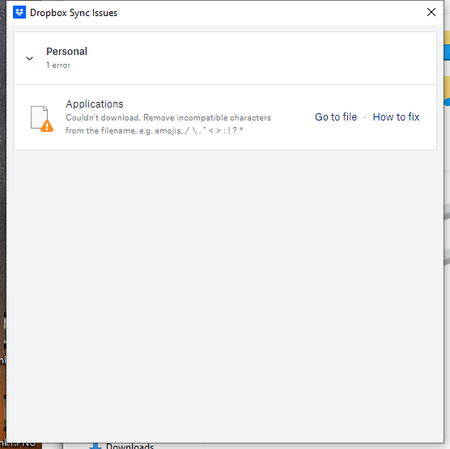
- 2 years ago
Hey Roy2010, no worries let me share Sam's response here as well.
Hi everyone,
Sharing an update on the topic: our team is working on adjusting this, and it's expected to roll out in our next Stable Build (V190).
You can check our releases here, and we'll keep you informed on the progress.
Thanks,
Sam
I appreciate your patience on this, thank you!


nomadism
2 years agoExplorer | Level 4
I've basically given up on this issue as if feels like dropbox support doesn't seem to really understand the issue here. I - among others who have raised this issue - are fully aware of what dropbox recommends to put and not put in file names. I really wish dropbox could stop leading us to that same help article.
What I want to know why dropbox says there are "sync errors" when there are not. Maybe initially there is an issue - hence the sync error message - but in the end, dropbox DOES upload those **bleep** files. So why is dropbox sending "false" sync errors messages, when eventually there isn't such an issue?

Fox2
2 years agoExplorer | Level 4
I agree - Dropbox support is not resolving the key issue here.
Walter asks for status and version, mine says 'Your files are up to date', and I am on v189.4.8395 on MacOS Monterey 12.7.2 (old-ish Mac Mini). I have the same problem on my Mac Air which is on Sonoma 14.1.2
1. The dialogue box that lists all the files has what appears to be a link 'View file' but the link does not work, it simply goes to the root file (as stated in previous posts) and does not go to the offending file at all. This needs to be fixed first so we can actually go to the problem file.
2. Part of the trouble-shooting advice in this thread is to go to your account on the web and search for incompatible characters. However, there does not appear to be any way to show or search for 'incompatible characters'. I have tried searching for (say) '?' but nothing is found in file names. Is there a menu option somewhere?
3 Worst, the dialogue box is not wide enough to show the full file name, so we have no chance of using Finder to locate the offender. An example of an error on my sync issues pop-up box is UsrClass.dat(4e7cc44b-d335-....... gtrans.ms where the dots perhaps represent characters omitted from the error message? By shortening the file name this way DropBox have compromised my ability to do any trouble shooting whatsoever.
4 Its more than just open files, the error is triggered for files that are closed; having said that they are complex file names so I can see they don't fit the 'mask' but the point is we need tools to find them.
5 More than anything, we (users) often don't have a choice about file naming, it may be controlled by the software author so just being able to find them and 'fudge' the file name to something that is accepted doesn't really solve the problem either as we (payers of the annual license) actually want it synchronised in its original state.
6 It's hard to prove whether a particular file synchronised or not (as per comment by nomadism) - its a 'Catch-22' problem if you can't find them...
I think this thread will run for a while...
But thank you for reading anyway.
 Galfodo2 years agoExplorer | Level 4
I came here because I have suddenly started to have the same issue. With files I have had in my dropbox for years and years. Suddenly it is not supposed to be legal to have dots ('.') in your filenames? This is perfectly legal on all OS's that I'm aware of, and lots of software create files with such names. I noticed that all the files the app complains about were created on/for a mac, and it looks to me like this may be the case for others as well.
This is some kind of regression and whether it be some blunder by the Dropbox developers or in a recent macOS update, it has to be fixed. Renaming files won't cut it.
About View, Download, and Export

Get support with viewing, downloading, and exporting files and folders from your Dropbox account.
The Dropbox Community team is active from Monday to Friday. We try to respond to you as soon as we can, usually within 2 hours.
If you need more help you can view your support options (expected response time for an email or ticket is 24 hours), or contact us on X, Facebook or Instagram.
For more info on available support options for your Dropbox plan, see this article.
If you found the answer to your question in this Community thread, please 'like' the post to say thanks and to let us know it was useful!


