Your workflow is unique 👨💻 - tell us how you use Dropbox here.
Forum Discussion

Dimples
3 years agoHelpful | Level 5
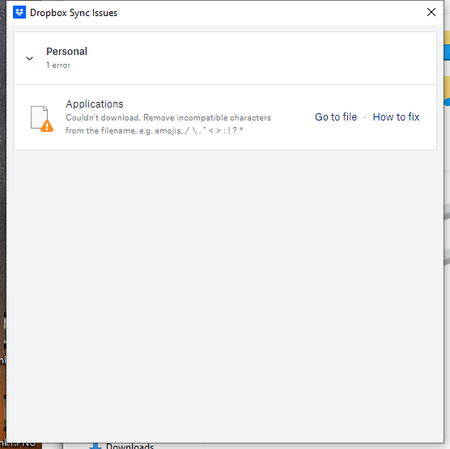
Couln't download. Remove incompatible characters from the filename
Recently all of my computer with Dropbox have started showing a sync error "Couln't download. Remove incompatible characters from the filename. e.g. emojis, /\"<>:|?*"
The problem filename isn'...
- 2 years ago
Hey Roy2010, no worries let me share Sam's response here as well.
Hi everyone,
Sharing an update on the topic: our team is working on adjusting this, and it's expected to roll out in our next Stable Build (V190).
You can check our releases here, and we'll keep you informed on the progress.
Thanks,
Sam
I appreciate your patience on this, thank you!

DavidLG
2 years agoNew member | Level 2
Just to add on, I was a friend of Drew Houston's in college and one of the first 100 users of Dropbox, and I've been using it the entire time (15 years or so). I've never had a significant issue and never needed customer support (even with the Dropbox folder moving locations due to macOS limitations, sometime in the last few years, and online-only files being a little janky).
I have at least 500 sync errors now (I'm not sure if it caps the list at 500), in version 189.4.8395, due to file names ending with tilde. This is crazy to me. I don't use Emacs anymore, so I probably could write a command-line command that removes all those files. But long-time users will eventually move away from Dropbox if it can't sync files with tilde in the name. That's not reasonable.

Megan Dropbox Community Moderator
2 years agoDropbox Community ModeratorHey guys,
You can see more about this in this related thread. If you have any questions, let us know.
I hope this helps!
 Samaelsquirrel2 years agoHelpful | Level 5
... nice fail.
Access DeniedYou do not have sufficient privileges for this resource or its parent to perform this action.Click your browser's Back button to continue.
 utpmg2 years agoHelpful | Level 7
Well, that link fails, but it seems to point to something related to Dropbox Beta. I'm not using Beta.
 Roy20102 years agoHelpful | Level 5
Hello Megan,
Unfortunately, I can not access the related thread you are referring to. I get this message when clicking on the link: "Access Denied
You do not have sufficient privileges for this resource or its parent to perform this action."Moreover, the problem still isn't fixed on Dropbox v.190.4.6383 and I do not understand why my thread was mixed with other ones, which seem related to special characters that my "problematic" files do not have, except an underscore. Could it be the reason for my issue? Anyway, the current error message "Dropbox can't sync this file or folder" does not help at all to understand the origin of the problem.
Thanks in advance for helping me out in troubleshooting the long standing issue.
Best,François
- Megan2 years ago
Hey Roy2010, no worries let me share Sam's response here as well.
Hi everyone,
Sharing an update on the topic: our team is working on adjusting this, and it's expected to roll out in our next Stable Build (V190).
You can check our releases here, and we'll keep you informed on the progress.
Thanks,
Sam
I appreciate your patience on this, thank you!
- Roy20102 years agoHelpful | Level 5
Hi Megan,
As of today, I still have the same sync issues. Is the Stable Build you are mentioning already out?
Best and thanks for your help,
François
About View, Download, and Export

Get support with viewing, downloading, and exporting files and folders from your Dropbox account.
The Dropbox Community team is active from Monday to Friday. We try to respond to you as soon as we can, usually within 2 hours.
If you need more help you can view your support options (expected response time for an email or ticket is 24 hours), or contact us on X, Facebook or Instagram.
For more info on available support options for your Dropbox plan, see this article.
If you found the answer to your question in this Community thread, please 'like' the post to say thanks and to let us know it was useful!


