Your workflow is unique 👨💻 - tell us how you use Dropbox here.
Forum Discussion

Dimples
3 years agoHelpful | Level 5
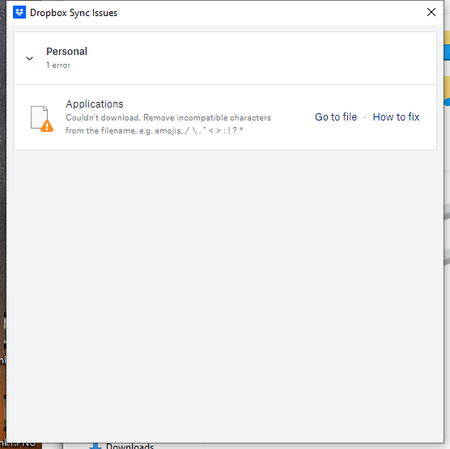
Couln't download. Remove incompatible characters from the filename
Recently all of my computer with Dropbox have started showing a sync error "Couln't download. Remove incompatible characters from the filename. e.g. emojis, /\"<>:|?*"
The problem filename isn'...
- 2 years ago
Hey Roy2010, no worries let me share Sam's response here as well.
Hi everyone,
Sharing an update on the topic: our team is working on adjusting this, and it's expected to roll out in our next Stable Build (V190).
You can check our releases here, and we'll keep you informed on the progress.
Thanks,
Sam
I appreciate your patience on this, thank you!


NanoExplorer
2 years agoHelpful | Level 6
Yeah the annoying thing is that Dropbox can't tell if there are files that end in tilde because of the restrictions from File Provider, so it can't even tell if you delete them from your mac. I suggest ignoring the error, but the other option is to delete them from the web or from a non-mac computer.
dsspiegelI suspect Apple pressured Dropbox into using File Provider. Apple seems to like making sure things are done 'their way' and in my opinion 'their way' often has weird quirks.
If I had any advice for Dropbox at this point it would be to make these errors clearer, so that instead of a generic message of "remove incompatible characters like /\"<>?*:|" that doesn't mention tilde, it would be more specific and say "cannot sync files that end in tilde on Mac - these files are still available on other platforms".
Again, I have had success ignoring the error (since all my non-mac computers can still see the tilde files fine) except the Dropbox app on my Mac is now stuck "syncing". I'd like the option to thoroughly ignore these errors on Mac so that the app behaves properly otherwise.

dsspiegel
2 years agoHelpful | Level 6
NanoExplorer Interesting. This is consistent with what you're saying: https://news.ycombinator.com/item?id=34650987
However, as far as I can tell, this is to enable a feature I'm not using — showing remote files that have never been downloaded as though they're on the local file system. It's unfortunate that Dropbox is giving me a degraded syncing experience on the files that I want to sync in order to enable me to use a feature that I'm not using anyway.
Also, not only is ~ not listed among the problematic characters, but . is listed as a problematic character. And "starting with . and ending with .swp" is not listed as a problem. So their error message is not as helpful or accurate as it could be.
About View, Download, and Export

Get support with viewing, downloading, and exporting files and folders from your Dropbox account.
The Dropbox Community team is active from Monday to Friday. We try to respond to you as soon as we can, usually within 2 hours.
If you need more help you can view your support options (expected response time for an email or ticket is 24 hours), or contact us on X, Facebook or Instagram.
For more info on available support options for your Dropbox plan, see this article.
If you found the answer to your question in this Community thread, please 'like' the post to say thanks and to let us know it was useful!


