Your workflow is unique 👨💻 - tell us how you use Dropbox here.
Forum Discussion

officeemployee205
2 years agoExplorer | Level 3
How to turn on 'open in - Finder'
Some of my team members can't view the open in - finder tab. I want everyone to have this ability so when people share links with each other they can quickly switch to Finder and sync and ite...

MarieRCH
1 year agoExplorer | Level 4
Hello Nancy,
Chrome used to be my default browser, now it's Edge.
I've cleared the cache, tried in incognito mode, as well as all the suggestions at your link but nothing worked.
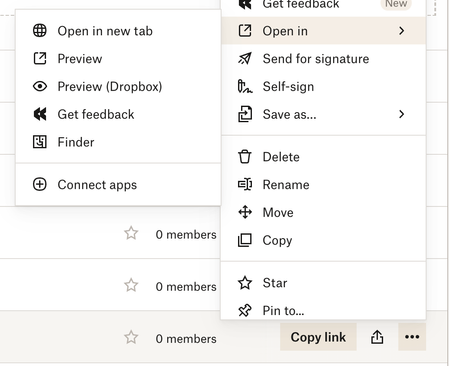
Just to clarify, the Open in button DOES appear, it just doesn't show the options to open in Finder.
I attach 2 screenshots, you can see the difference between Edge (on the left) and Chrome (on the right).
I do not want to use Chrome moving forward. How can I make the Open in Finder option work in Edge?
Edited to add: this isn't something new, my colleagues and I have all always found that we could only Open in Finder with Chrome.

Nancy Dropbox Community Moderator
1 year agoDropbox Community ModeratorThanks for the extra info! Can you also clarify what’s the current app version of your desktop app? Since the “Open it” option is directly linked to the Dropbox app, I’d like to make sure everything’s in order there.
- MarieRCH1 year agoExplorer | Level 4
v200.4.7134
About View, Download, and Export

Get support with viewing, downloading, and exporting files and folders from your Dropbox account.
The Dropbox Community team is active from Monday to Friday. We try to respond to you as soon as we can, usually within 2 hours.
If you need more help you can view your support options (expected response time for an email or ticket is 24 hours), or contact us on X, Facebook or Instagram.
For more info on available support options for your Dropbox plan, see this article.
If you found the answer to your question in this Community thread, please 'like' the post to say thanks and to let us know it was useful!


