Your workflow is unique 👨💻 - tell us how you use Dropbox here.
Forum Discussion

ABC_999
2 years agoExplorer | Level 3
Syncing doesn't work. A few files change and hours later they still haven't showed up to the web.
I wanted a solution to have files backed up online (typical dropbox) but I also have certain files (a few handfuls) I need always available when I am offline (off the internet). I am often offline f...

ABC_999
2 years agoExplorer | Level 3
Still not receiving any help for this problem.

Hannah Dropbox Community Moderator
2 years agoDropbox Community ModeratorSorry to jump in here, ABC_999.
Can you please let us know which steps you followed to get to the Dropbox version in your screenshot?
Were you able to locate the Dropbox icon? And if so, what do you see when hovering over it? We're particularly interested in the sync status.
Also, if you can give us the ticket number for your communication with our support team, we'd greatly appreciate it.
- ABC_9992 years agoExplorer | Level 3
I don't remember how I got the app version, obviously an about. But it is the same version that shows when I hover over the dropbox icon in the menu bar. I am not seeing the problem right now (looked after the laptop was on the internet 30 minutes) and I don't have time to do more reproducing since I spent so much time yesterday and today getting info to dropbox. When I see it happen next I will grab the syncing status. But no matter what, being on a very strong internet and changing only one very small file should not take 30 minutes to upload it to dropbox (especially when it was the only file that changed).
I did a chat session again yesterday, I was told 2 tickets would be created and emailed to me. The two issues that stop me dead cold from using dropbox are:
- laptop not syncing/very very slow syncing (I have to manually upload the folders/files from the dropbox webpage)
- offline not working on mobile devices - file not available when not on internet. This is the whole reason I paid for dropbox but as I said it seems to work for a short while then stops. The files are never updated.
I was only given ticket number that discusses both issues but ended with being the laptop not syncing problem Ticket #22186542.
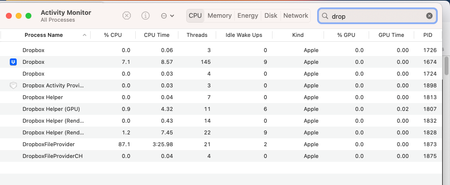
The problem happened again yesterday for the not syncing problem and I added some screenshots. I got a reply but the replying agent didn't understand the issue and posted a "here is how it works" explanation without even looking because I clearly showed in my screen shots that it was not working as he said it should. So I replied again and explained what that agent missed.
I feel I am spending way more time on this than dropbox and the agents time (combined) and that the reps I am talking to on chat (and responding to the ticket) don't understand the basics of what is going on.
Example why did it take hours working with agents before I was told (by you all not the agent but even then it took a while for someone to say it works this way, here is where you go to do that and by then I had searched again and found an answer). First one said there was an app on ventura but could not say at all how to get to the icon - 30 min of my time. Second one said there was no app but at least could answer (accurately) information on how the product worked. Then after days and back and forth finally someone here says there is an app and I went searching again in the forum and found a reference to how to get it to show. Very very frustrating and honestly a waste of time.
About View, Download, and Export

Get support with viewing, downloading, and exporting files and folders from your Dropbox account.
The Dropbox Community team is active from Monday to Friday. We try to respond to you as soon as we can, usually within 2 hours.
If you need more help you can view your support options (expected response time for an email or ticket is 24 hours), or contact us on X, Facebook or Instagram.
For more info on available support options for your Dropbox plan, see this article.
If you found the answer to your question in this Community thread, please 'like' the post to say thanks and to let us know it was useful!


