Your workflow is unique 👨💻 - tell us how you use Dropbox here.
Forum Discussion

Rei3e
2 years agoHelpful | Level 6
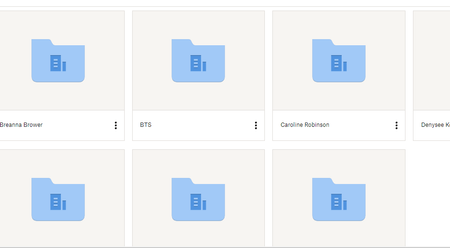
There's a change in the way files preview with grey boxes around.
Hi there! Dropbox recently updated the preview image experience and there is now grey shadow boxed around all of the image previews. Unfortunately, for individuals such as myself who have to cull thr...

leveeroadstudio
2 years agoHelpful | Level 6
Jay First, I copy a folder's shared link. Then, I would paste the link into an incognito (logged out) browser, and all of the images within the file were shown, hyperlinked to their individual share links. From there, I could highlight all of the images, copy, and paste right into my spreadsheet.
The new preview layout seems to have cloaked the individual share links. So, now I think it's time for Dropbox to add a feature that allows users to copy multiple links without jumping through all of these hoops.
Google Drive has this feature. Photobucket even has this feature. Dropbox, being a leader in the cloud storage space, SHOULD have this feature!!

Hannah Dropbox Community Moderator
2 years agoDropbox Community ModeratorWe appreciate the clarification and the feedback here, leveeroadstudio.
We're always looking for ways to make Dropbox better and more efficient, so I'll pass this on to the team.
About View, Download, and Export

Get support with viewing, downloading, and exporting files and folders from your Dropbox account.
The Dropbox Community team is active from Monday to Friday. We try to respond to you as soon as we can, usually within 2 hours.
If you need more help you can view your support options (expected response time for an email or ticket is 24 hours), or contact us on X, Facebook or Instagram.
For more info on available support options for your Dropbox plan, see this article.
If you found the answer to your question in this Community thread, please 'like' the post to say thanks and to let us know it was useful!


