We’re Still Here to Help (Even Over the Holidays!) - find out more here.
Forum Discussion

Johnnykick
5 years agoExplorer | Level 3
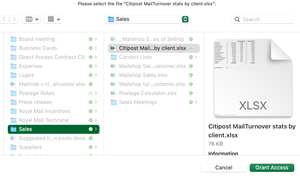
"Grant Access" on an Apple Mac.
Hi - hope someone can help me.
I have been a user of dropbox for years and find it very useful.
Installed and all good on my MacBook Air but when I try and open a file directly from finder on my ...

Elixir
5 years agoStar | Level 19
Hello Johnnykick, from the sync icon next to your excel file, it could be that the file is not fully dowloaded. Can you please first right click, from smart sync menu make it local before opening? What happens to other excel files which has solid green sync icon?

Johnnykick
4 years agoExplorer | Level 3
Hi Elixir,
This is happening again to me even on local files.
I can't access any Excel files now. I can access word files and other office docs just excel.
It does the same as before - the files are all ticked green as being local files as well!?!?
can you help?
- Nancy4 years ago
Dropbox Community Moderator
Hi Johnnykick, hope you don’t mind me jumping in.
Can you clarify what’s the exact OS that you’re using?
Also, I’d appreciate it if you can send me the app version of your Dropbox app, as well as a screenshot of what you see when accessing these files. Just make sure none of your personal info is showing.
Thanks a lot!

About Create, upload, and share
Find help to solve issues with creating, uploading, and sharing files and folders in Dropbox. Get support and advice from the Dropbox Community.
The Dropbox Community team is active from Monday to Friday. We try to respond to you as soon as we can, usually within 2 hours.
If you need more help you can view your support options (expected response time for an email or ticket is 24 hours), or contact us on X, Facebook or Instagram.
For more info on available support options for your Dropbox plan, see this article.
If you found the answer to your question in this Community thread, please 'like' the post to say thanks and to let us know it was useful!


