We’re Still Here to Help (Even Over the Holidays!) - find out more here.
Forum Discussion

StephG75
11 months agoNew member | Level 1
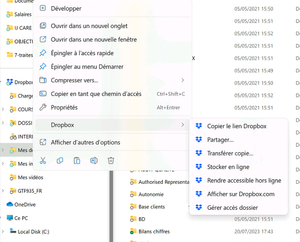
I don't see any option to make my folders online-only/offline on my new Windows 10 computer.
Hello, I just changed my PC.
I had Dropbox installed on the old PC in windows 10, I could see ALL folders and only sync in my local PC folders/files useful, which were downloaded on demand.
B...

StephG75
11 months agoNew member | Level 1
Hello and thx for your answers.
Looking at your URL, this synchronization options should be different right ?
For information, might be important, here is my configuration :
It's a Microsoft Surface Pro 11th edition.
As you asked, I disconnect and reconnect Dropbox App, but strictly no differences occur.
This error leads me to Comment résoudre les erreurs de synchronisation de Dropbox et d’autres problèmes - Aide de Dropbox.
I have no real errors syncing the selected files&folders, but that's not the way I need to work.
MY GOAL: to find a complete view of the whole dropbox in the windows explorer, even if everything is only available online, and open the files I need to make them available locally.
Thx for your support.

Nancy Dropbox Community Moderator
11 months agoDropbox Community ModeratorHi again! One more thing I’d like to ask is whether you installed the Dropbox app with admin rights during the last reinstall (this will help isolate the issue a bit more and check what else may be happening here).
About Create, upload, and share
Find help to solve issues with creating, uploading, and sharing files and folders in Dropbox. Get support and advice from the Dropbox Community.
The Dropbox Community team is active from Monday to Friday. We try to respond to you as soon as we can, usually within 2 hours.
If you need more help you can view your support options (expected response time for an email or ticket is 24 hours), or contact us on X, Facebook or Instagram.
For more info on available support options for your Dropbox plan, see this article.
If you found the answer to your question in this Community thread, please 'like' the post to say thanks and to let us know it was useful!


