Your workflow is unique 👨💻 - tell us how you use Dropbox here.
Forum Discussion

dhillman
2 years agoNew member | Level 2
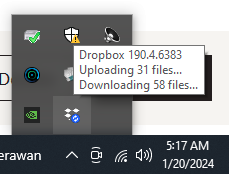
Never stop syncing, no tick marks on folder, no dropbox menu on right-click
Hi all. Anyone experiencing the same issues with me?
1. My dropbox NEVER stopped syncing. I have no idea which files are being synced (downloading or uploading). It's been like this for weeks. ...

Rich Super User II
2 years agoSuper User II
dhillman wrote:
Never stop syncing, no tick marks on folder, no dropbox menu on right-click
Exit the Dropbox application if you're able to, check Task Manager and end any remaining Dropbox tasks that you see (Update and Service can be left alone), then launch Dropbox again.

dhillman
2 years agoNew member | Level 2
No luck. After doing what you suggested and restarted dropbox, it's the same thing.
- Jay2 years ago
Dropbox Community Moderator
Hi dhillman, could you try reinstalling the app, without uninstalling it first, to see if this helps?
- dhillman2 years agoNew member | Level 2
Didn't work. Same exact problem still.


About Create, Upload, and Share
Find help to solve issues with creating, uploading, and sharing files and folders with Dropbox.
The Dropbox Community team is active from Monday to Friday. We try to respond to you as soon as we can, usually within 2 hours.
If you need more help you can view your support options (expected response time for an email or ticket is 24 hours), or contact us on X, Facebook or Instagram.
For more info on available support options for your Dropbox plan, see this article.
If you found the answer to your question in this Community thread, please 'like' the post to say thanks and to let us know it was useful!


