We’re Still Here to Help (Even Over the Holidays!) - find out more here.
Forum Discussion

ashtrey1980
4 years agoHelpful | Level 5
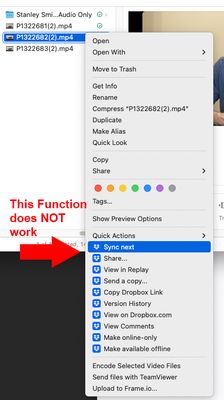
Sync Next not working through Mac Finder interface
I have lots syncing all day long. It is not uncommon for me to get back from a video shoot, upload 200 Gb (takes about 48 hours with my internet speeds), and then the next day, I'll need to upload a...

Rich Super User II
4 years agoSuper User II
I can't speak to the issue you're having (I'm not a Mac user) so I'll leave that for someone else to answer. I just wanted to let you know that I've edited your post to remove the mention of Selective Sync to avoid confusion. Selective Sync is a specific feature that's used to remove local folders to save disk space and is unrelated to what you're doing here. It's accessible through the Sync tab in Dropbox Preferences.
About Create, upload, and share
Find help to solve issues with creating, uploading, and sharing files and folders in Dropbox. Get support and advice from the Dropbox Community.
The Dropbox Community team is active from Monday to Friday. We try to respond to you as soon as we can, usually within 2 hours.
If you need more help you can view your support options (expected response time for an email or ticket is 24 hours), or contact us on X, Facebook or Instagram.
For more info on available support options for your Dropbox plan, see this article.
If you found the answer to your question in this Community thread, please 'like' the post to say thanks and to let us know it was useful!


