Need to see if your shared folder is taking up space on your dropbox 👨💻? Find out how to check here.
Forum Discussion

nuko
3 months agoNew member | Level 2
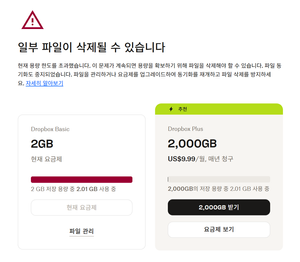
I can't access my Dropbox files online after exceeding my storage quota.
Device
I'm sure that this is unrelated to device, but it's pc.
Operating System/Browser (if using the web)
win11 chrome
Question or Issue
I'm currently invited into some team, a...

Nancy Dropbox Community Moderator
3 months agoDropbox Community ModeratorHi nuko, and thanks for posting on our forum.
I’ve forwarded your comments to our team, so that they can log your feedback and take this into account in the future.
As for your team, do you mean that each one of you has their own Dropbox account and you’re sharing files among you?
I just want to make sure that you’re not all using the same Dropbox account (under the same email address), since that’s against our Terms of Service and it could potentially result in the termination of the Dropbox account in question (for more details, please also check this Help Center article).
Other than that, I’ll be here in case you need something else.
About Storage Space
Looking for help with managing the storage space in your Dropbox account? Talk to the Dropbox Community and get advice from members.
The Dropbox Community team is active from Monday to Friday. We try to respond to you as soon as we can, usually within 2 hours.
If you need more help you can view your support options (expected response time for an email or ticket is 24 hours), or contact us on X, Facebook or Instagram.
For more info on available support options for your Dropbox plan, see this article.
If you found the answer to your question in this Community thread, please 'like' the post to say thanks and to let us know it was useful!


