Need to see if your shared folder is taking up space on your dropbox 👨💻? Find out how to check here.
Forum Discussion

mhurley142
3 months agoNew member | Level 2
My Dropbox account contains less than 100MB of data, but it keeps saying it's full.
Dropbox Plan Personal Free Device (Dell XPS 15, Samsung Galaxy S23.) Operating System/Browser (if using the web) (Windows 11, Android 15 Dropbox App Version (if using the app) not available as...
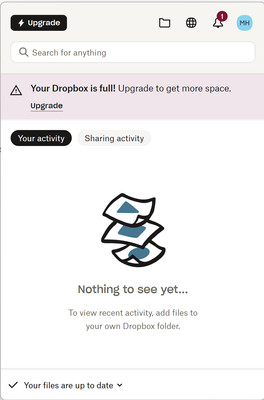
- 3 months ago
What does http://www.dropbox.com/account/plan show?
Also have you set up http://www.dropbox.com/backups ?


mhurley142
3 months agoNew member | Level 2
Resolved thank you. The backup was an external drive that was no longer connected so I simply deleted the backup. (It was created in error anyway!)
Thnak You
About Storage Space
Looking for help with managing the storage space in your Dropbox account? Talk to the Dropbox Community and get advice from members.
The Dropbox Community team is active from Monday to Friday. We try to respond to you as soon as we can, usually within 2 hours.
If you need more help you can view your support options (expected response time for an email or ticket is 24 hours), or contact us on X, Facebook or Instagram.
For more info on available support options for your Dropbox plan, see this article.
If you found the answer to your question in this Community thread, please 'like' the post to say thanks and to let us know it was useful!


