Need to see if your shared folder is taking up space on your dropbox 👨💻? Find out how to check here.
Forum Discussion

rasikanandana
2 years agoExplorer | Level 3
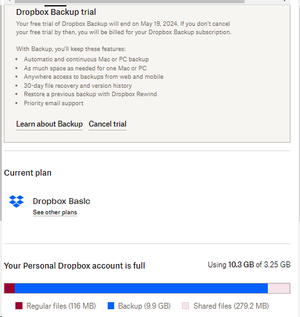
Seeing that my Dropbox account is full, even though I'm on the Backup plan

Nancy Dropbox Community Moderator
2 years agoDropbox Community ModeratorThanks for these screenshots! Before switching to the Backup plan, did you have external drive backup enabled on your free account?
Did your Dropbox account go recently out of space, or has it been showing over-quota ever since the upgrade to the Backup plan?

rasikanandana
2 years agoExplorer | Level 3
No.
""Thanks for these screenshots! Before switching to the Backup plan, did you have external drive backup enabled on your free account? " NO
"Did your Dropbox account go recently out of space NO
, or has it been showing over-quota ever since the upgrade to the Backup plan? " YES, just after adding the unlimited backup plan, even it is storing in a separate location https://www.dropbox.com/backup
It is a technical issue of the Dropbox that has not yet been resolved ( I have contacted technical team via email two weeks ago and still they are working on it)
- Hannah2 years ago
Hey rasikanandana, the backups page (https://www.dropbox.com/backup/all) is not really a separate location; it's just the place where you can access your backups from.
Can you please give us the ticket number for your communication with our support team, so we can have a look as well?

About Storage Space
Looking for help with managing the storage space in your Dropbox account? Talk to the Dropbox Community and get advice from members.
The Dropbox Community team is active from Monday to Friday. We try to respond to you as soon as we can, usually within 2 hours.
If you need more help you can view your support options (expected response time for an email or ticket is 24 hours), or contact us on X, Facebook or Instagram.
For more info on available support options for your Dropbox plan, see this article.
If you found the answer to your question in this Community thread, please 'like' the post to say thanks and to let us know it was useful!


