Your workflow is unique 👨💻 - tell us how you use Dropbox here.
Forum Discussion

Dario1250
3 years agoHelpful | Level 5
After latest Dropbox update, documents on Mac are set to open with Dropbox by default
MacBook Pro M1 with the MacOS Ventura 13.1 installed. I use the Dropbox Plus plan, and I predominantly access files through my Finder app. The Dropbox app notified me of the new update — I instal...

zjtest
3 years agoHelpful | Level 6
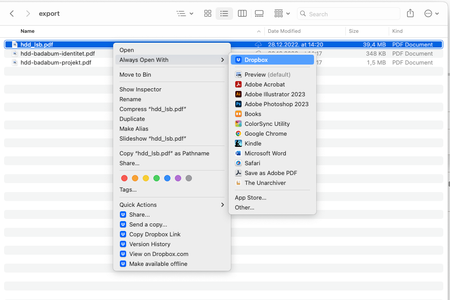
Ever since upgrading to v164.4.7914 on macos ventura dropbox replaces the default apps for pdf docx etc file names. Going to file -> get info and changing the default application back to word/finder -> change all does not work. Does anyone know how to fix this???
I have to do the steps in the images above inorder to get the file to open with the correct application and not dropbox.
About Apps and Installations
Have a question about a Dropbox app or installation? Reach out to the Dropbox Community and get solutions, help, and advice from members.
The Dropbox Community team is active from Monday to Friday. We try to respond to you as soon as we can, usually within 2 hours.
If you need more help you can view your support options (expected response time for an email or ticket is 24 hours), or contact us on X, Facebook or Instagram.
For more info on available support options for your Dropbox plan, see this article.
If you found the answer to your question in this Community thread, please 'like' the post to say thanks and to let us know it was useful!


