Your workflow is unique 👨💻 - tell us how you use Dropbox here.
Forum Discussion

Dario1250
3 years agoHelpful | Level 5
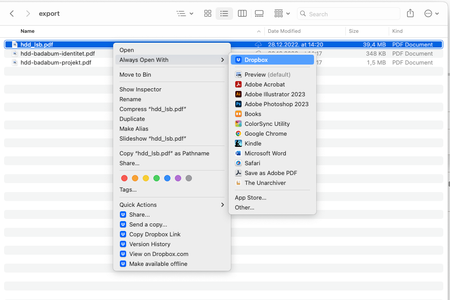
After latest Dropbox update, documents on Mac are set to open with Dropbox by default
MacBook Pro M1 with the MacOS Ventura 13.1 installed. I use the Dropbox Plus plan, and I predominantly access files through my Finder app. The Dropbox app notified me of the new update — I instal...

kartoone
3 years agoNew member | Level 2
I am also having the same problem. M1 Mac with Ventura and updated to the latest version of Dropbox 164.4.7194
I've tried rebooting and tried "Open With" and then saying "Always open with", but it seems to default back to trying to open in Dropbox even though it says Word should be the default! I've also attached error message I am now starting to see when I just double-click anyway knowing that it won't open.

Hannah Dropbox Community Moderator
3 years agoDropbox Community ModeratorHey zjtest, I moved your post to this thread, which seems to reflect your issue.
Thanks for reaching out as well, kartoone.
As Walter mentioned previously in this thread, our engineers are aware of the situation and are currently working on resolving it.
Thanks for letting us know and we'll update you on this, once we have more info.
 JR683 years agoNew member | Level 2
Hello,
MacBook Pro. oSX Monterey 12.6.1
Does this thread also cover that my local Documents on my Macbook are now routed to the dropbox folder? The Documents folder has disappeared from Finder and now listed under Dropbox as 'My Mac (Jxxx-Macbook-Pro.local.) I moved Documents back, but clicking on the folder takes me to the dropbox folder under Locations.
I want this moved back, as not all files were synced with Dropbox and now they appear to be.
Thanks!
- JR683 years agoNew member | Level 2
Seems I had dropbox back-up switched on. I have disabled this and all files are now correctly returned to the documents on local.
About Apps and Installations
Have a question about a Dropbox app or installation? Reach out to the Dropbox Community and get solutions, help, and advice from members.
The Dropbox Community team is active from Monday to Friday. We try to respond to you as soon as we can, usually within 2 hours.
If you need more help you can view your support options (expected response time for an email or ticket is 24 hours), or contact us on X, Facebook or Instagram.
For more info on available support options for your Dropbox plan, see this article.
If you found the answer to your question in this Community thread, please 'like' the post to say thanks and to let us know it was useful!


