Your workflow is unique 👨💻 - tell us how you use Dropbox here.
Forum Discussion

emilialiu
2 years agoHelpful | Level 5
Cannot start Dropbox app on Macbook
Hi,
I installed Dropbox app on Macbook Pro, system Ventura 13.2.1 (22D68), but it cannot start. I have already tried to reinstall it, but still did not work.
And the error file:
bn.BUILD...
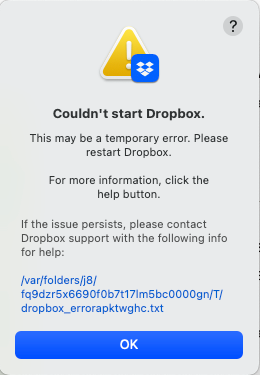
 2 years agoIt mysteriously solved. When I restarted my mac after an update and gave it another try, it suddenly popped out log-in issues which showed that dropbox identified my mac as a new device each time I tried to log in, so I cannot log in due to exceeding the maximum number of devices I was allowed. After I removed my login devices, it finally start.

danclarkis
2 years agoExplorer | Level 4
Megan Thank you. Here goes:
Text file (from yesterday, not this morning):
bn.BUILD_KEY: Dropbox
bn.VERSION: 171.4.6182
bn.constants.WINDOWS_SHELL_EXT_VERSION: 61
bn.is_frozen: True
machine_id: 8262a460-2a1d-5111-a513-abea42da5864
pid: 7573
ppid: 1
uid: 501
user_info: pwd.struct_passwd(pw_name='danclark', pw_passwd='********', pw_uid=501, pw_gid=20, pw_gecos='Dan Clark', pw_dir='/Users/danclark', pw_shell='/bin/zsh')
effective_user_info: pwd.struct_passwd(pw_name='danclark', pw_passwd='********', pw_uid=501, pw_gid=20, pw_gecos='Dan Clark', pw_dir='/Users/danclark', pw_shell='/bin/zsh')
euid: 501
gid: 20
egid: 20
group_info: grp.struct_group(gr_name='staff', gr_passwd='*', gr_gid=20, gr_mem=['root', 'danclark', '_nsurlstoraged'])
effective_group_info: grp.struct_group(gr_name='staff', gr_passwd='*', gr_gid=20, gr_mem=['root', 'danclark', '_nsurlstoraged'])
DYLD_LIBRARY_PATH: None
cwd: '/'
real_path='/'
mode=0o40755 uid=0 gid=0
parent mode=0o40755 uid=0 gid=0
HOME: '/Users/danclark'
appdata: '/Users/danclark/.dropbox/instance2'
real_path='/Users/danclark/.dropbox/instance2'
mode=0o40700 uid=501 gid=20
parent mode=0o40700 uid=501 gid=20
dropbox_path: '/Users/danclark/Library/CloudStorage/Dropbox'
real_path='/Users/danclark/Library/CloudStorage/Dropbox'
not found
parent mode=0o40755 uid=501 gid=20
sys_executable: '/Applications/Dropbox.app/Contents/MacOS/Dropbox'
real_path='/Applications/Dropbox.app/Contents/MacOS/Dropbox'
mode=0o100755 uid=501 gid=20
parent mode=0o40755 uid=501 gid=20
trace.__file__: '/Applications/Dropbox.app/Contents/Resources/python-packages.zip/dropbox/client/ui/common/boot_error.pyc'
real_path='/Applications/Dropbox.app/Contents/Resources/python-packages.zip/dropbox/client/ui/common/boot_error.pyc'
not found
parent not found
tempdir: '/var/folders/xv/f3f5nkks3bldxywzq03_hr4c0000gn/T'
real_path='/private/var/folders/xv/f3f5nkks3bldxywzq03_hr4c0000gn/T'
mode=0o40700 uid=501 gid=20
parent mode=0o40755 uid=501 gid=20
Traceback (most recent call last):
File "dropbox/client/main.pyc", line 5219, in _setup_root_for_account
File "dropbox/sync_root/helpers.pyc", line 511, in get_root_for_account
File "dropbox/foundation/futures/basic.pyc", line 857, in result
File "dropbox/sync_root/handlers/macos/file_provider.pyc", line 121, in set_result_or_convert_exception
dropbox.mac.internal.MacError: [Errno -2001] Error Domain=NSFileProviderErrorDomain Code=-2001 "No valid file provider found with identifier ‘com.getdropbox.dropbox.fileprovider/9331ffb8-052a-4a13-8a62-4a53b90a38b3‘." UserInfo={NSLocalizedDescription=No valid file provider found with identifier ‘com.getdropbox.dropbox.fileprovider/9331ffb8-052a-4a13-8a62-4a53b90a38b3‘.}

Jay Dropbox Community Moderator
2 years agoDropbox Community ModeratorHi danclarkis, could you try reinstalling the app, without uninstalling it first, by using this link, and let me know how it goes!
- danclarkis2 years agoExplorer | Level 4
Hi Jay
For info, I uninstalled and reinstalled yesterday.
Today, I have reinstalled without uninstalling, as requested. No joy. This is the error code this time:
bn.BUILD_KEY: Dropbox
bn.VERSION: 171.4.6182
bn.constants.WINDOWS_SHELL_EXT_VERSION: 61
bn.is_frozen: True
machine_id: 8262a460-2a1d-5111-a513-abea42da5864
pid: 12319
ppid: 1
uid: 501
user_info: pwd.struct_passwd(pw_name='danclark', pw_passwd='********', pw_uid=501, pw_gid=20, pw_gecos='Dan Clark', pw_dir='/Users/danclark', pw_shell='/bin/zsh')
effective_user_info: pwd.struct_passwd(pw_name='danclark', pw_passwd='********', pw_uid=501, pw_gid=20, pw_gecos='Dan Clark', pw_dir='/Users/danclark', pw_shell='/bin/zsh')
euid: 501
gid: 20
egid: 20
group_info: grp.struct_group(gr_name='staff', gr_passwd='*', gr_gid=20, gr_mem=['root', 'danclark', '_nsurlstoraged'])
effective_group_info: grp.struct_group(gr_name='staff', gr_passwd='*', gr_gid=20, gr_mem=['root', 'danclark', '_nsurlstoraged'])
DYLD_LIBRARY_PATH: None
cwd: '/'
real_path='/'
mode=0o40755 uid=0 gid=0
parent mode=0o40755 uid=0 gid=0
HOME: '/Users/danclark'
appdata: '/Users/danclark/.dropbox/instance2'
real_path='/Users/danclark/.dropbox/instance2'
mode=0o40700 uid=501 gid=20
parent mode=0o40700 uid=501 gid=20
dropbox_path: '/Users/danclark/Library/CloudStorage/Dropbox'
real_path='/Users/danclark/Library/CloudStorage/Dropbox'
not found
parent mode=0o40755 uid=501 gid=20
sys_executable: '/Applications/Dropbox.app/Contents/MacOS/Dropbox'
real_path='/Applications/Dropbox.app/Contents/MacOS/Dropbox'
mode=0o100755 uid=501 gid=20
parent mode=0o40755 uid=501 gid=20
trace.__file__: '/Applications/Dropbox.app/Contents/Resources/python-packages.zip/dropbox/client/ui/common/boot_error.pyc'
real_path='/Applications/Dropbox.app/Contents/Resources/python-packages.zip/dropbox/client/ui/common/boot_error.pyc'
not found
parent not found
tempdir: '/var/folders/xv/f3f5nkks3bldxywzq03_hr4c0000gn/T'
real_path='/private/var/folders/xv/f3f5nkks3bldxywzq03_hr4c0000gn/T'
mode=0o40700 uid=501 gid=20
parent mode=0o40755 uid=501 gid=20
Traceback (most recent call last):
File "dropbox/client/main.pyc", line 5219, in _setup_root_for_account
File "dropbox/sync_root/helpers.pyc", line 511, in get_root_for_account
File "dropbox/foundation/futures/basic.pyc", line 857, in result
File "dropbox/sync_root/handlers/macos/file_provider.pyc", line 121, in set_result_or_convert_exception
dropbox.mac.internal.MacError: [Errno -2001] Error Domain=NSFileProviderErrorDomain Code=-2001 "No valid file provider found with identifier ‘com.getdropbox.dropbox.fileprovider/9331ffb8-052a-4a13-8a62-4a53b90a38b3‘." UserInfo={NSLocalizedDescription=No valid file provider found with identifier ‘com.getdropbox.dropbox.fileprovider/9331ffb8-052a-4a13-8a62-4a53b90a38b3‘.}- Nancy2 years ago
Hi ValGols and danclarkis!
Can you please follow the steps below, as well, and let me know if they make any difference at all?
- Click the Dropbox icon in the menu bar at the top of your screen.
- Click your profile picture or initials in the upper right of the window that appears.
- Click Quit.
- Open a new Finder window.
- Click Applications.
- Double-click the Dropbox icon.
- danclarkis2 years agoExplorer | Level 4
Hi Nancy There's no dropbox icon in the menubar because I can't start it. When I try to get dropbox going, there's a grey icon (but which is not properly usable to select menu actions) for a minute . But that disappears as soon as dropbox comes up with the error code saying 'unable to start'.

About Apps and Installations
Have a question about a Dropbox app or installation? Reach out to the Dropbox Community and get solutions, help, and advice from members.
The Dropbox Community team is active from Monday to Friday. We try to respond to you as soon as we can, usually within 2 hours.
If you need more help you can view your support options (expected response time for an email or ticket is 24 hours), or contact us on X, Facebook or Instagram.
For more info on available support options for your Dropbox plan, see this article.
If you found the answer to your question in this Community thread, please 'like' the post to say thanks and to let us know it was useful!


