Your workflow is unique 👨💻 - tell us how you use Dropbox here.
Forum Discussion

emilialiu
2 years agoHelpful | Level 5
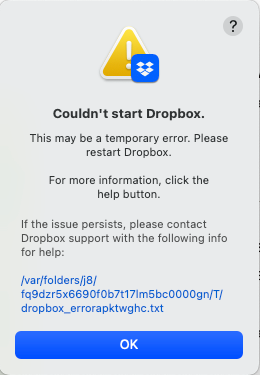
Cannot start Dropbox app on Macbook
Hi,
I installed Dropbox app on Macbook Pro, system Ventura 13.2.1 (22D68), but it cannot start. I have already tried to reinstall it, but still did not work.
And the error file:
bn.BUILD...
 2 years agoIt mysteriously solved. When I restarted my mac after an update and gave it another try, it suddenly popped out log-in issues which showed that dropbox identified my mac as a new device each time I tried to log in, so I cannot log in due to exceeding the maximum number of devices I was allowed. After I removed my login devices, it finally start.

ValGols
2 years agoNew member | Level 2
Hi Hannah,
I can't get mine to work either, followed the steps you advised. Could I please get the issue investigated too? Thanks.

Megan Dropbox Community Moderator
2 years agoDropbox Community ModeratorHi ValGols & danclarkis, I just sent you both an email, I'll see you there!
 klauswieselmann2 years agoNew member | Level 2
Hello Megan,
I seem to have a similar problem – I've, too, made sure that everything is up to date and get a similar error message (see below). What's more, ever since the update to a previous newer version, I've had problems saving files. Not sure if that's connected. Could you give me an email address I can write to about this? Thank you in advance!
Lukas
bn.BUILD_KEY: Dropbox
bn.VERSION: 172.4.7555
bn.constants.WINDOWS_SHELL_EXT_VERSION: 61
bn.is_frozen: True
machine_id: 96101d10-7f07-5656-9e68-35b60403a62e
pid: 2076
ppid: 1
uid: 501
user_info: pwd.struct_passwd(pw_name='lukas', pw_passwd='********', pw_uid=501, pw_gid=20, pw_gecos='Lukas ***', pw_dir='/Users/lukas', pw_shell='/bin/bash')
effective_user_info: pwd.struct_passwd(pw_name='lukas', pw_passwd='********', pw_uid=501, pw_gid=20, pw_gecos='Lukas ****', pw_dir='/Users/lukas', pw_shell='/bin/bash')
euid: 501
gid: 20
egid: 20
group_info: grp.struct_group(gr_name='staff', gr_passwd='*', gr_gid=20, gr_mem=['root', 'lukas', '_serialnumberd'])
effective_group_info: grp.struct_group(gr_name='staff', gr_passwd='*', gr_gid=20, gr_mem=['root', 'lukas', '_serialnumberd'])
DYLD_LIBRARY_PATH: None
cwd: '/'
real_path='/'
mode=0o40755 uid=0 gid=0
parent mode=0o40755 uid=0 gid=0
HOME: '/Users/lukas'
appdata: '/Users/lukas/.dropbox/**'
real_path='/Users/***/.dropbox/***'
mode=0o40700 uid=501 gid=20
parent mode=0o40700 uid=501 gid=20
dropbox_path: '/Users/***/Library/CloudStorage/Dropbox'
real_path='/Users/****/Library/CloudStorage/Dropbox'
mode=0o40700 uid=501 gid=20
parent mode=0o40755 uid=501 gid=20
sys_executable: '/Applications/Dropbox.app/Contents/MacOS/Dropbox'
real_path='/Applications/Dropbox.app/Contents/MacOS/Dropbox'
mode=0o100755 uid=501 gid=20
parent mode=0o40755 uid=501 gid=20
trace.__file__: '/Applications/Dropbox.app/Contents/Resources/python-packages.zip/dropbox/client/ui/common/boot_error.pyc'
real_path='/Applications/Dropbox.app/Contents/Resources/python-packages.zip/dropbox/client/ui/common/boot_error.pyc'
not found
parent not found
tempdir: '/var/folders/vs/70p0_1zd4vlf65ms0d8_7vvr0000gn/T'
real_path='/private/var/folders/vs/70p0_1zd4vlf65ms0d8_7vvr0000gn/T'
mode=0o40700 uid=501 gid=20
parent mode=0o40755 uid=501 gid=20
Traceback (most recent call last):
File "dropbox/client/main.pyc", line 5219, in _setup_root_for_account
File "dropbox/sync_root/helpers.pyc", line 511, in get_root_for_account
File "dropbox/foundation/futures/basic.pyc", line 857, in result
File "dropbox/sync_root/handlers/macos/file_provider.pyc", line 121, in set_result_or_convert_exception
dropbox.mac.internal.MacError: [Errno -2001] Error Domain=NSFileProviderErrorDomain Code=-2001 "A provider with ID com.getdropbox.dropbox.fileprovider was found, but is in the process of being invalidated. Retry later." UserInfo={NSDebugDescription=A provider with ID com.getdropbox.dropbox.fileprovider was found, but is in the process of being invalidated. Retry later., NSLocalizedDescription=The application cannot be used right now.}
- Megan2 years ago
Hi klauswieselmann, welcome to our Community!
Have you tried these steps, by any chance ever since you started receiving the error with Dropbox? You also mentioned you had issues saving files, could you let me know more about this?
What steps did you follow, and did you get any specific errors?
Keep me posted!
 LuckyE2 years agoNew member | Level 2
Hi
I have tried all the steps mentioned in this post, still can't get dropbox app to work. Any new solution?
Thank you
About Apps and Installations
Have a question about a Dropbox app or installation? Reach out to the Dropbox Community and get solutions, help, and advice from members.
The Dropbox Community team is active from Monday to Friday. We try to respond to you as soon as we can, usually within 2 hours.
If you need more help you can view your support options (expected response time for an email or ticket is 24 hours), or contact us on X, Facebook or Instagram.
For more info on available support options for your Dropbox plan, see this article.
If you found the answer to your question in this Community thread, please 'like' the post to say thanks and to let us know it was useful!


