Your workflow is unique 👨💻 - tell us how you use Dropbox here.
Forum Discussion

emilialiu
2 years agoHelpful | Level 5
Cannot start Dropbox app on Macbook
Hi,
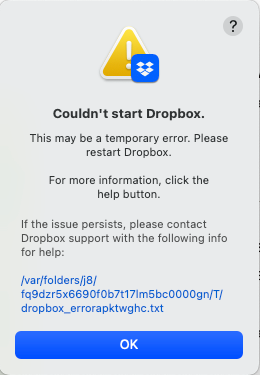
I installed Dropbox app on Macbook Pro, system Ventura 13.2.1 (22D68), but it cannot start. I have already tried to reinstall it, but still did not work.
And the error file:
bn.BUILD...
 2 years agoIt mysteriously solved. When I restarted my mac after an update and gave it another try, it suddenly popped out log-in issues which showed that dropbox identified my mac as a new device each time I tried to log in, so I cannot log in due to exceeding the maximum number of devices I was allowed. After I removed my login devices, it finally start.

al f.
2 years agoExplorer | Level 4
I'm beyond super frustrated and highly annoyed with the lack of actual support here from all of you at DB! I've been through 2 sections of this same issue and not a single support person has any actual clue of how to fix this issue.
MY ENTIRE WORKFLOW has not been completely disrupted for the past 2 weeks an my desktop is a giant mess with files and folders everywhere that should be in my DB folders and safely backed up!
I am running MacOS 12.6.5
Dropbox 173.4.6706 [the latest update I could find]
Here is my error -
bn.BUILD_KEY: Dropbox
bn.VERSION: 173.4.6706
bn.constants.WINDOWS_SHELL_EXT_VERSION: 61
bn.is_frozen: True
machine_id: 0bdce52f-177b-550d-9a86-655ab452bb5f
pid: 713
ppid: 1
uid: 501
user_info: pwd.struct_passwd(pw_name='alfriede', pw_passwd='********', pw_uid=501, pw_gid=20, pw_gecos='alfriede', pw_dir='/Users/alfriede', pw_shell='/bin/bash')
effective_user_info: pwd.struct_passwd(pw_name='alfriede', pw_passwd='********', pw_uid=501, pw_gid=20, pw_gecos='alfriede', pw_dir='/Users/alfriede', pw_shell='/bin/bash')
euid: 501
gid: 20
egid: 20
group_info: grp.struct_group(gr_name='staff', gr_passwd='*', gr_gid=20, gr_mem=['root', 'alfriede', '_nsurlstoraged', '_serialnumberd'])
effective_group_info: grp.struct_group(gr_name='staff', gr_passwd='*', gr_gid=20, gr_mem=['root', 'alfriede', '_nsurlstoraged', '_serialnumberd'])
DYLD_LIBRARY_PATH: None
cwd: '/'
real_path='/'
mode=0o40755 uid=0 gid=0
parent mode=0o40755 uid=0 gid=0
HOME: '/Users/alfriede'
appdata: '/Users/alfriede/.dropbox/instance6'
real_path='/Users/alfriede/.dropbox/instance6'
mode=0o40700 uid=501 gid=20
parent mode=0o40755 uid=501 gid=20
dropbox_path: '/Users/alfriede/Library/CloudStorage/Dropbox'
real_path='/Users/alfriede/Library/CloudStorage/Dropbox'
not found
parent mode=0o40755 uid=501 gid=20
sys_executable: '/Applications/Dropbox.app/Contents/MacOS/Dropbox'
real_path='/Applications/Dropbox.app/Contents/MacOS/Dropbox'
mode=0o100755 uid=501 gid=20
parent mode=0o40755 uid=501 gid=20
trace.__file__: '/Applications/Dropbox.app/Contents/Resources/python-packages.zip/dropbox/client/ui/common/boot_error.pyc'
real_path='/Applications/Dropbox.app/Contents/Resources/python-packages.zip/dropbox/client/ui/common/boot_error.pyc'
not found
parent not found
tempdir: '/var/folders/13/65c95p2d44j4f2qjsfhk0fyc0000gn/T'
real_path='/private/var/folders/13/65c95p2d44j4f2qjsfhk0fyc0000gn/T'
mode=0o40700 uid=501 gid=20
parent mode=0o40755 uid=501 gid=20
Traceback (most recent call last):
File "desktop/dropbox/client/main.py", line 5253, in _setup_root_for_account
File "desktop/dropbox/sync_root/helpers.py", line 511, in get_root_for_account
File "desktop/dropbox/foundation/futures/basic.py", line 857, in result
File "desktop/dropbox/sync_root/handlers/macos/file_provider.py", line 121, in set_result_or_convert_exception
dropbox.mac.internal.MacError: [Errno -2001] Error Domain=NSFileProviderErrorDomain Code=-2001 "No valid file provider found with identifier com.getdropbox.dropbox.fileprovider/d56282a6-3c82-4a57-bf23-3abc212d1d2b." UserInfo={NSLocalizedDescription=No valid file provider found with identifier com.getdropbox.dropbox.fileprovider/d56282a6-3c82-4a57-bf23-3abc212d1d2b.}

Nancy Dropbox Community Moderator
2 years agoDropbox Community ModeratorHey al f., I hope you’re doing well.
Before we can investigate this further, can you confirm if you’ve already tried these steps?
Let me know, and we’ll take it from there.
- al f.2 years agoExplorer | Level 4
Correct, and keep in mind this was all working until the 12.6.5 update or perhaps the update just before it. I'm also a pro IT and Apple Tech for 25 years so I'm not someone who doesn't know how to troubleshoot issues like this to the point where if I can't figure it out and have to post on here, it's a big deal for me!
Here's my error upon timing out -
bn.BUILD_KEY: Dropboxbn.VERSION: 173.4.6706bn.constants.WINDOWS_SHELL_EXT_VERSION: 61bn.is_frozen: Truemachine_id: 0bdce52f-177b-550d-9a86-655ab452bb5fpid: 6524ppid: 1uid: 501user_info: pwd.struct_passwd(pw_name='alfriede', pw_passwd='********', pw_uid=501, pw_gid=20, pw_gecos='alfriede', pw_dir='/Users/alfriede', pw_shell='/bin/bash')effective_user_info: pwd.struct_passwd(pw_name='alfriede', pw_passwd='********', pw_uid=501, pw_gid=20, pw_gecos='alfriede', pw_dir='/Users/alfriede', pw_shell='/bin/bash')euid: 501gid: 20egid: 20group_info: grp.struct_group(gr_name='staff', gr_passwd='*', gr_gid=20, gr_mem=['root', 'alfriede', '_nsurlstoraged', '_serialnumberd'])effective_group_info: grp.struct_group(gr_name='staff', gr_passwd='*', gr_gid=20, gr_mem=['root', 'alfriede', '_nsurlstoraged', '_serialnumberd'])DYLD_LIBRARY_PATH: Nonecwd: '/'real_path='/'mode=0o40755 uid=0 gid=0parent mode=0o40755 uid=0 gid=0HOME: '/Users/alfriede'appdata: '/Users/alfriede/.dropbox/instance6'real_path='/Users/alfriede/.dropbox/instance6'mode=0o40700 uid=501 gid=20parent mode=0o40755 uid=501 gid=20dropbox_path: '/Users/alfriede/Library/CloudStorage/Dropbox'real_path='/Users/alfriede/Library/CloudStorage/Dropbox'not foundparent mode=0o40755 uid=501 gid=20sys_executable: '/Applications/Dropbox.app/Contents/MacOS/Dropbox'real_path='/Applications/Dropbox.app/Contents/MacOS/Dropbox'mode=0o100755 uid=501 gid=20parent mode=0o40755 uid=501 gid=20trace.__file__: '/Applications/Dropbox.app/Contents/Resources/python-packages.zip/dropbox/client/ui/common/boot_error.pyc'real_path='/Applications/Dropbox.app/Contents/Resources/python-packages.zip/dropbox/client/ui/common/boot_error.pyc'not foundparent not foundtempdir: '/var/folders/13/65c95p2d44j4f2qjsfhk0fyc0000gn/T'real_path='/private/var/folders/13/65c95p2d44j4f2qjsfhk0fyc0000gn/T'mode=0o40700 uid=501 gid=20parent mode=0o40755 uid=501 gid=20Traceback (most recent call last):File "desktop/dropbox/client/main.py", line 5253, in _setup_root_for_accountFile "desktop/dropbox/sync_root/helpers.py", line 511, in get_root_for_accountFile "desktop/dropbox/foundation/futures/basic.py", line 857, in resultFile "desktop/dropbox/sync_root/handlers/macos/file_provider.py", line 121, in set_result_or_convert_exceptiondropbox.mac.internal.MacError: [Errno -2001] Error Domain=NSFileProviderErrorDomain Code=-2001 "No valid file provider found with identifier com.getdropbox.dropbox.fileprovider/d56282a6-3c82-4a57-bf23-3abc212d1d2b." UserInfo={NSLocalizedDescription=No valid file provider found with identifier com.getdropbox.dropbox.fileprovider/d56282a6-3c82-4a57-bf23-3abc212d1d2b.}  Dech2 years agoHelpful | Level 5
have the same problem after running the update my Dropbox will not start... Exactly the same error.. I had to delete my Dropbox as it got stuck in Sync. After reloading the error happened...
problem is: it loads into applications, Its should load into the CloudStorage folder
I.E error- cannot find the folder..
dropbox_path: '/Users/alfriede/Library/CloudStorage/Dropbox'real_path='/Users/alfriede/Library/CloudStorage/Dropbox'not found.....................................- Walter2 years ago
Hey Dech, sorry to hear about this.
Can you confirm that you've already tried these steps and you rebooted your computer?
- Dech2 years agoHelpful | Level 5Hi Walter
I managed to fix my DB. I reloaded my Mac to Ventura 13.3, added DB app, which added the app into the application folder, then updated to 13.3.1. I then updated my DB which put my DB folder into the cloud storage folder. Then it all started to work.. thank you for your reply… - al f.2 years agoExplorer | Level 4
I'm on a MBP Mid-2015 so I cannot update to MacOS 13 vs stuck at 12, so glad you fixed your issue but I've tried doing all of that 3 or 4 times already to no avail and had to end up resorting to using Maestrel [which works perfectly like DB used to] as a stop gap until this insanity is fixed!
Cheers
- al f.2 years agoExplorer | Level 4
Sure!
- Dech2 years agoHelpful | Level 5
Hi
I have 5 x macbook pro 2012 running on opencore. 2 x OS 12 and 3 x OS 13.. When reloading. load with the first edition Os 12 ..e.g 12.1.. then add your DB app (on line only) this should add it to you application folder-- let it sync and do its thing. then update your OS e.g- 12.1 to 12.3. once updated. let DB update itself or ask you to update. your DB folder should move to your CloudStorage Folder.. Let it sync and do its thing again.. be patient...... Then if you need, you can set your DB to off-line and add all your folders - if you work DB off line... 3 of my Pro's updated with no problems at all.... 2 , I had to reload the software to get DB working again...
- al f.2 years agoExplorer | Level 4
Hi Megan, I'll get to that email ASAP this weekend to try to fix my DB issue once and for all.
Thx


About Apps and Installations
Have a question about a Dropbox app or installation? Reach out to the Dropbox Community and get solutions, help, and advice from members.
The Dropbox Community team is active from Monday to Friday. We try to respond to you as soon as we can, usually within 2 hours.
If you need more help you can view your support options (expected response time for an email or ticket is 24 hours), or contact us on X, Facebook or Instagram.
For more info on available support options for your Dropbox plan, see this article.
If you found the answer to your question in this Community thread, please 'like' the post to say thanks and to let us know it was useful!


