Your workflow is unique 👨💻 - tell us how you use Dropbox here.
Forum Discussion

DB231113
5 months agoHelpful | Level 6
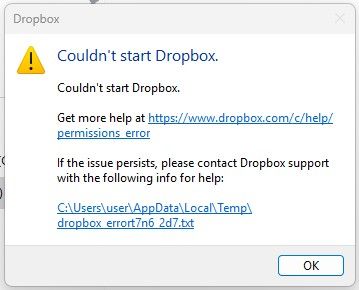
Couldn't start Dropbox due to a permission error. What can I do?
My Win 11 Dropbox client suddenly stopped working and I'm now receiving a permission error. I attempted a re-installation but still get the exact same error.
Any suggestions on how this can be fix...
 5 months ago
Turns out my dropbox files folder on the D Drive had somehow had the "Hidden" folder attribute applied. This was stopping dropbox from accessing this location on startup.
Correcting this attribute resolved the issue.
DB231113
5 months agoHelpful | Level 6
Turns out my dropbox files folder on the D Drive had somehow had the "Hidden" folder attribute applied. This was stopping dropbox from accessing this location on startup.
Correcting this attribute resolved the issue.


About Apps and Installations
Have a question about a Dropbox app or installation? Reach out to the Dropbox Community and get solutions, help, and advice from members.
The Dropbox Community team is active from Monday to Friday. We try to respond to you as soon as we can, usually within 2 hours.
If you need more help you can view your support options (expected response time for an email or ticket is 24 hours), or contact us on X, Facebook or Instagram.
For more info on available support options for your Dropbox plan, see this article.
If you found the answer to your question in this Community thread, please 'like' the post to say thanks and to let us know it was useful!


