Your workflow is unique 👨💻 - tell us how you use Dropbox here.
Forum Discussion

mtncat
1 month agoNew member | Level 2
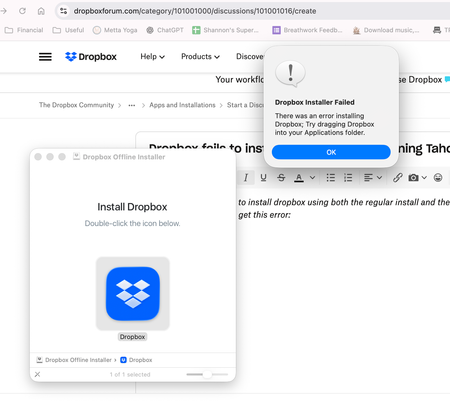
Dropbox fails to install on my new Mac M4 running Tahoe.
I've tried multiple time to install dropbox using both the regular install and the offline install. I enter my password and then get this error (and if I drag the dmg to applications, I just get a sh...

mtncat
1 month agoNew member | Level 2
Hi Nancy--thanks for the quick reply. Yes, I'm on a basic plan. No antivirus/firewall/other security. Devices above.

Megan Dropbox Community Moderator
1 month agoDropbox Community ModeratorHey mtncat, let me jump in here!
As a first step, keep in mind that I noticed on your screenshot that you currently have 3 devices connected to your account. In order to be able to sign in to this new device you'd need to follow the steps that my colleague, Nancy provided earlier.
With that being said, I don't think that would prevent you from installing our desktop app in the first place. Can you try an advanced reinstall following the steps provided here?
About Apps and Installations
Have a question about a Dropbox app or installation? Reach out to the Dropbox Community and get solutions, help, and advice from members.
The Dropbox Community team is active from Monday to Friday. We try to respond to you as soon as we can, usually within 2 hours.
If you need more help you can view your support options (expected response time for an email or ticket is 24 hours), or contact us on X, Facebook or Instagram.
For more info on available support options for your Dropbox plan, see this article.
If you found the answer to your question in this Community thread, please 'like' the post to say thanks and to let us know it was useful!


