Your workflow is unique 👨💻 - tell us how you use Dropbox here.
Forum Discussion

mtncat
1 month agoNew member | Level 2
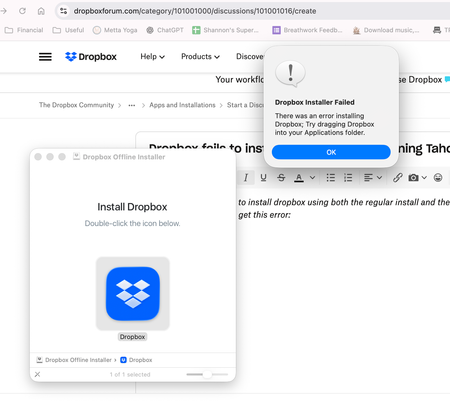
Dropbox fails to install on my new Mac M4 running Tahoe.
I've tried multiple time to install dropbox using both the regular install and the offline install. I enter my password and then get this error (and if I drag the dmg to applications, I just get a sh...

mtncat
1 month agoNew member | Level 2
Hi Megan -- I've unlinked all devices just to cross that off the list of potential problems (screenshot below and then i tried an offline install, same error). I'm looking at the advanced reinstall link, and although it says that it provides instructions, I don't see any actual instructions (screenshots attached). Should I be performing an uninstall or are there other instructions that are supposed to be here?
- Megan1 month ago
Dropbox Community Moderator
Hey mtncat!
Here are the steps for your Mac device. Keep in mind that if the device is new, and since the app isn't installed you might need to skip 1-3, and proceed with the rest.
If that doesn't resolve your issue, I'll be happy to send you an email in order to investigate further. Thanks a bunch!

About Apps and Installations
Have a question about a Dropbox app or installation? Reach out to the Dropbox Community and get solutions, help, and advice from members.
The Dropbox Community team is active from Monday to Friday. We try to respond to you as soon as we can, usually within 2 hours.
If you need more help you can view your support options (expected response time for an email or ticket is 24 hours), or contact us on X, Facebook or Instagram.
For more info on available support options for your Dropbox plan, see this article.
If you found the answer to your question in this Community thread, please 'like' the post to say thanks and to let us know it was useful!


