Your workflow is unique 👨💻 - tell us how you use Dropbox here.
Forum Discussion

redakce
1 year agoNew member | Level 1
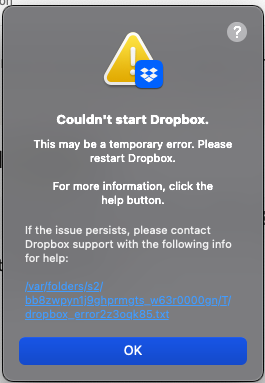
Dropbox throws a startup error on my macOS Big Sur computer.
Hi everybody. I'm not able to start Dropbox desktop app. After reinstalling on Mac os Big Sur the problem persists.
- 1 year ago
Thanks for sending over the full error log, redakce! After checking it, there are two usernames showing, so this seems to be the reason why you’re seeing this error indeed.
Can you follow these steps and let me know if they help?


redakce
1 year agoNew member | Level 1
Wow! It really helped! Many thanks and I'll download linked page af pdf for future. Many thanks again!

Theresa Community Manager
1 year agoCommunity ManagerHi redakce and welcome to the Dropbox Community. I am glad to see that your issue was resolved with Nancy's help.
I'm Theresa a Community Manager here at Dropbox HQ 👩💻. I love to hear how our Community members use Dropbox on a daily basis. If you're open to sharing I would love to hear from you 🤗.
You never know, we may be able to offer you some tips or maybe you have a suggestion you would like to pass on to our internal team.
Looking forward to hearing from you,
T 😸 (Dropbox Community Manager)
About Apps and Installations
Have a question about a Dropbox app or installation? Reach out to the Dropbox Community and get solutions, help, and advice from members.
The Dropbox Community team is active from Monday to Friday. We try to respond to you as soon as we can, usually within 2 hours.
If you need more help you can view your support options (expected response time for an email or ticket is 24 hours), or contact us on X, Facebook or Instagram.
For more info on available support options for your Dropbox plan, see this article.
If you found the answer to your question in this Community thread, please 'like' the post to say thanks and to let us know it was useful!


